
Test Data
Address Function Type
Prerequisites
Before you begin, ensure that you have referred to:
Selecting Address as a Function Type for Data Generator
Section titled “Selecting Address as a Function Type for Data Generator”-
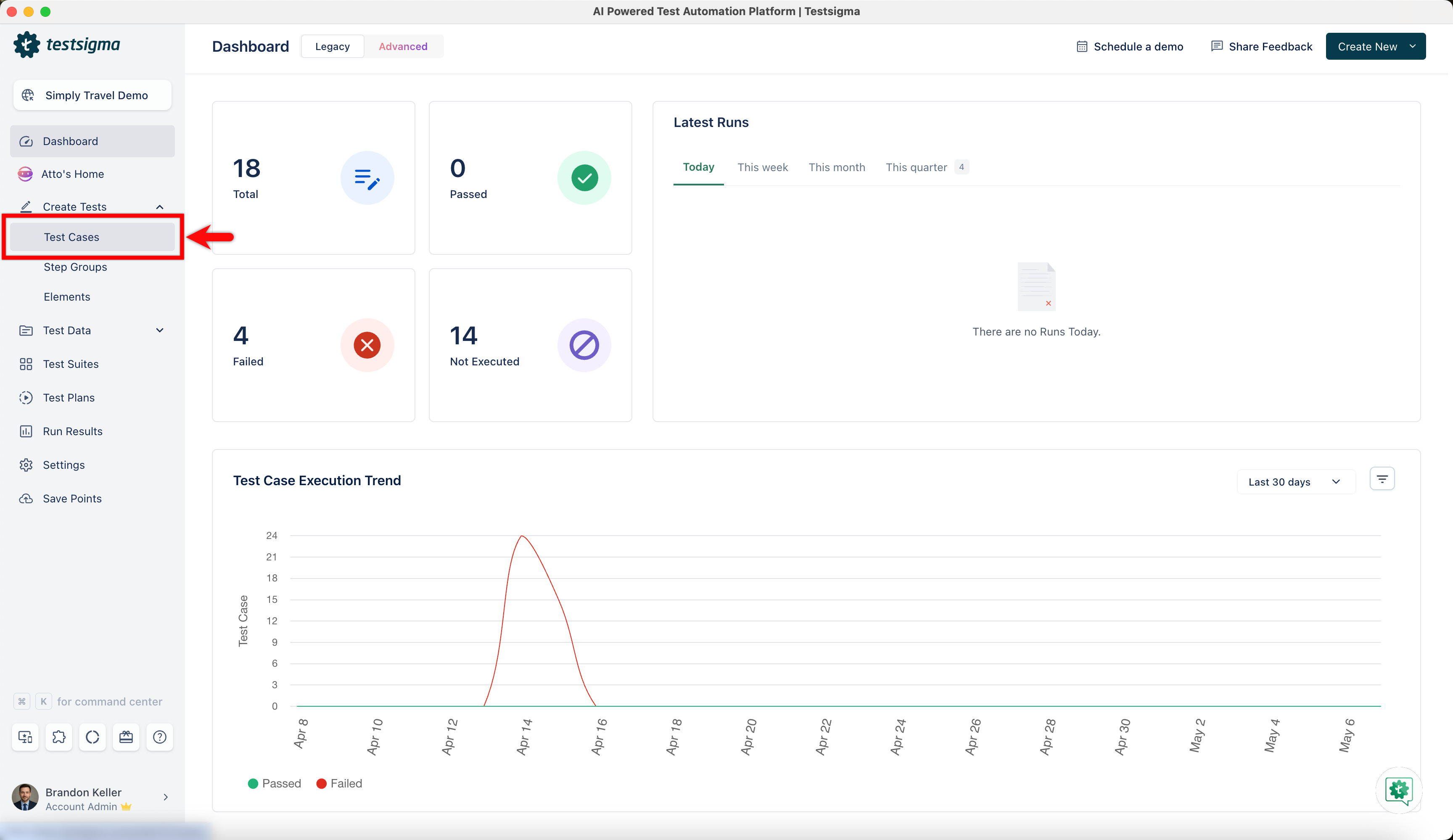
From the left navigation bar, go to Create Tests > Test Cases and create a new test case.
-
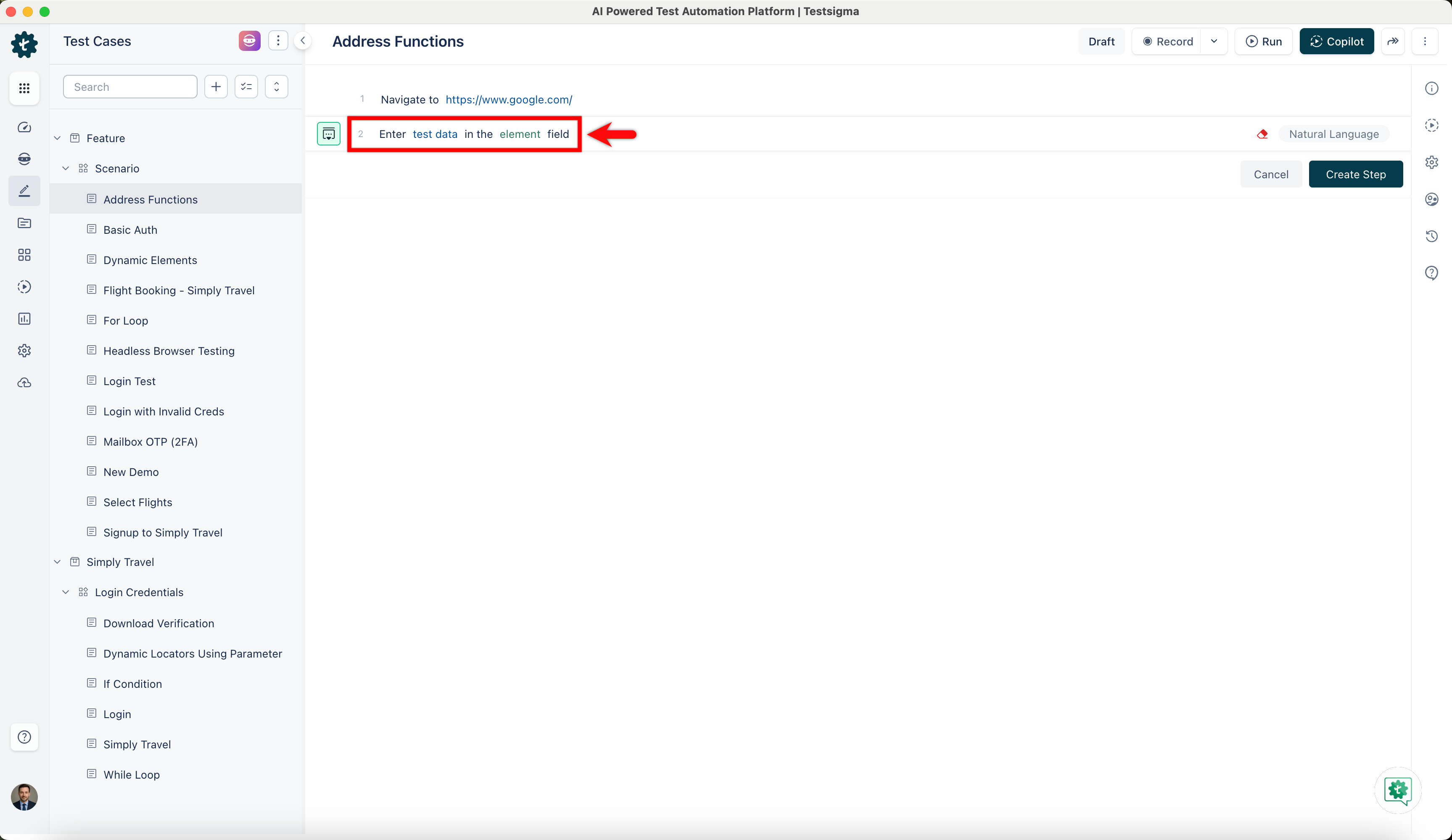
Use NLP to create a new step in the test case and include a placeholder for test data.
-
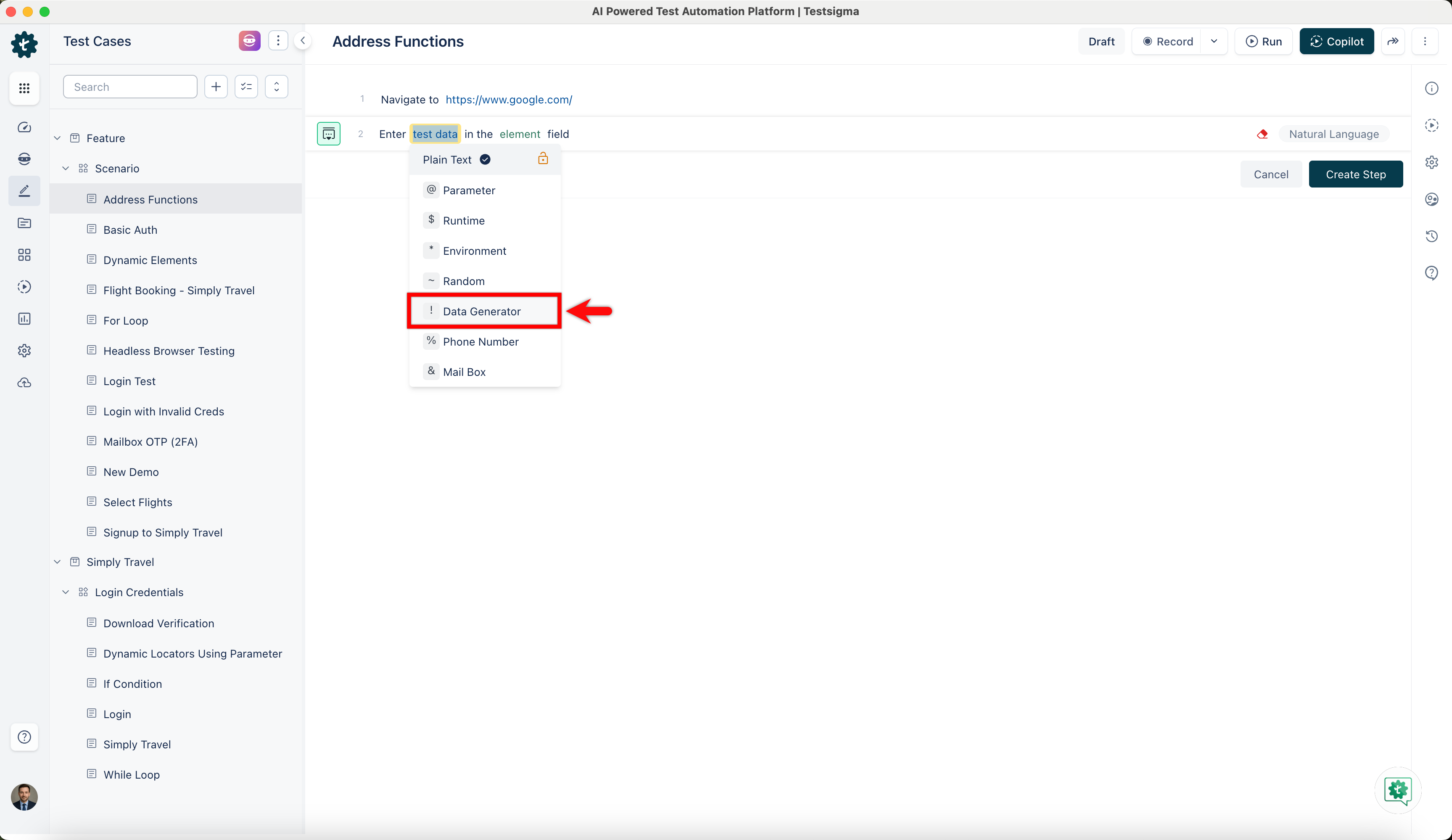
Click on the test data placeholder. From the Test Data Types dropdown menu, select the ! Data Generator option.
-
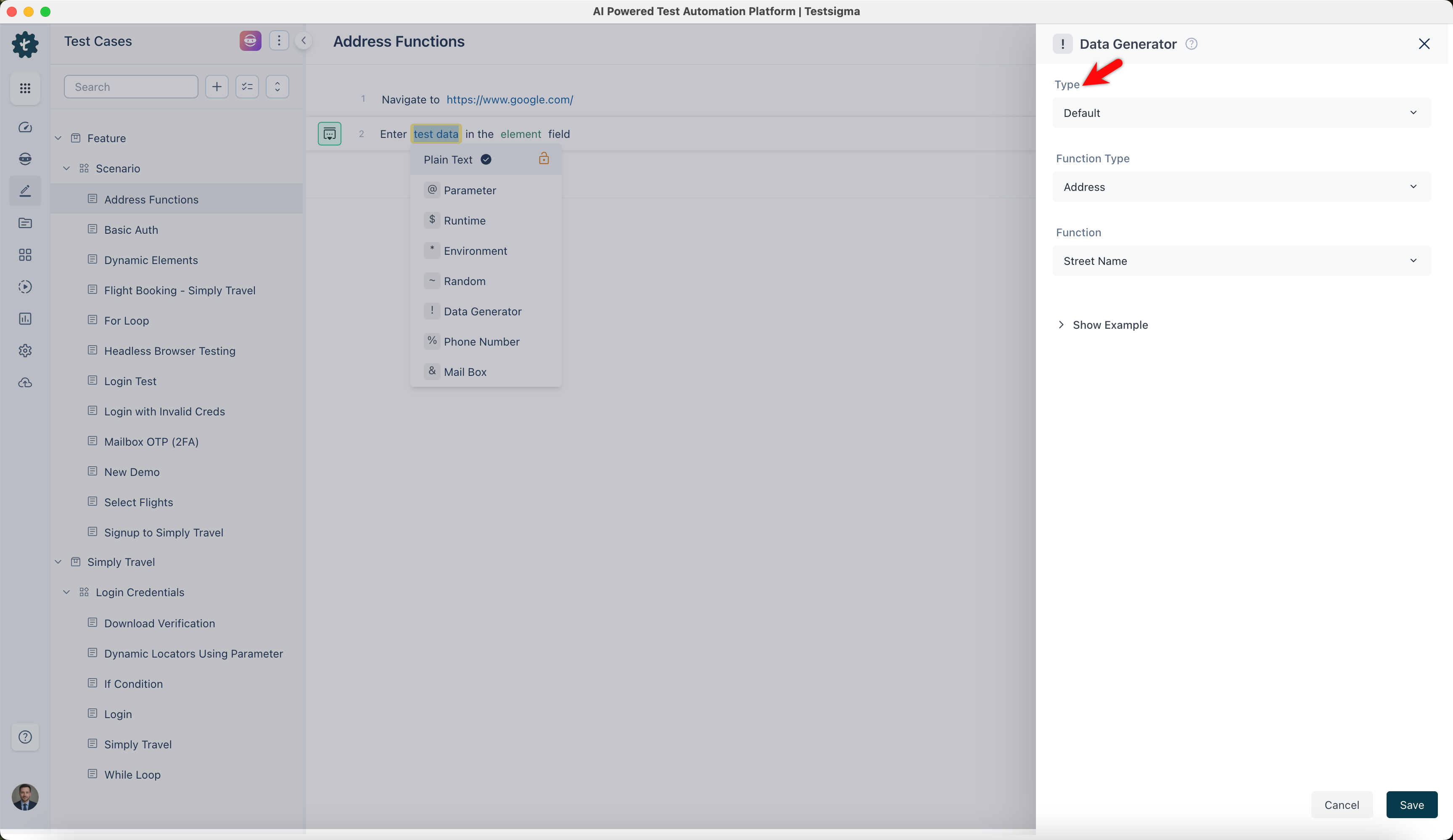
On the ! Data Generators overlay screen, select the Type to Default. This will enable you to use a collection of built-in test data generators.
-
Select Address from the Function Type dropdown list.
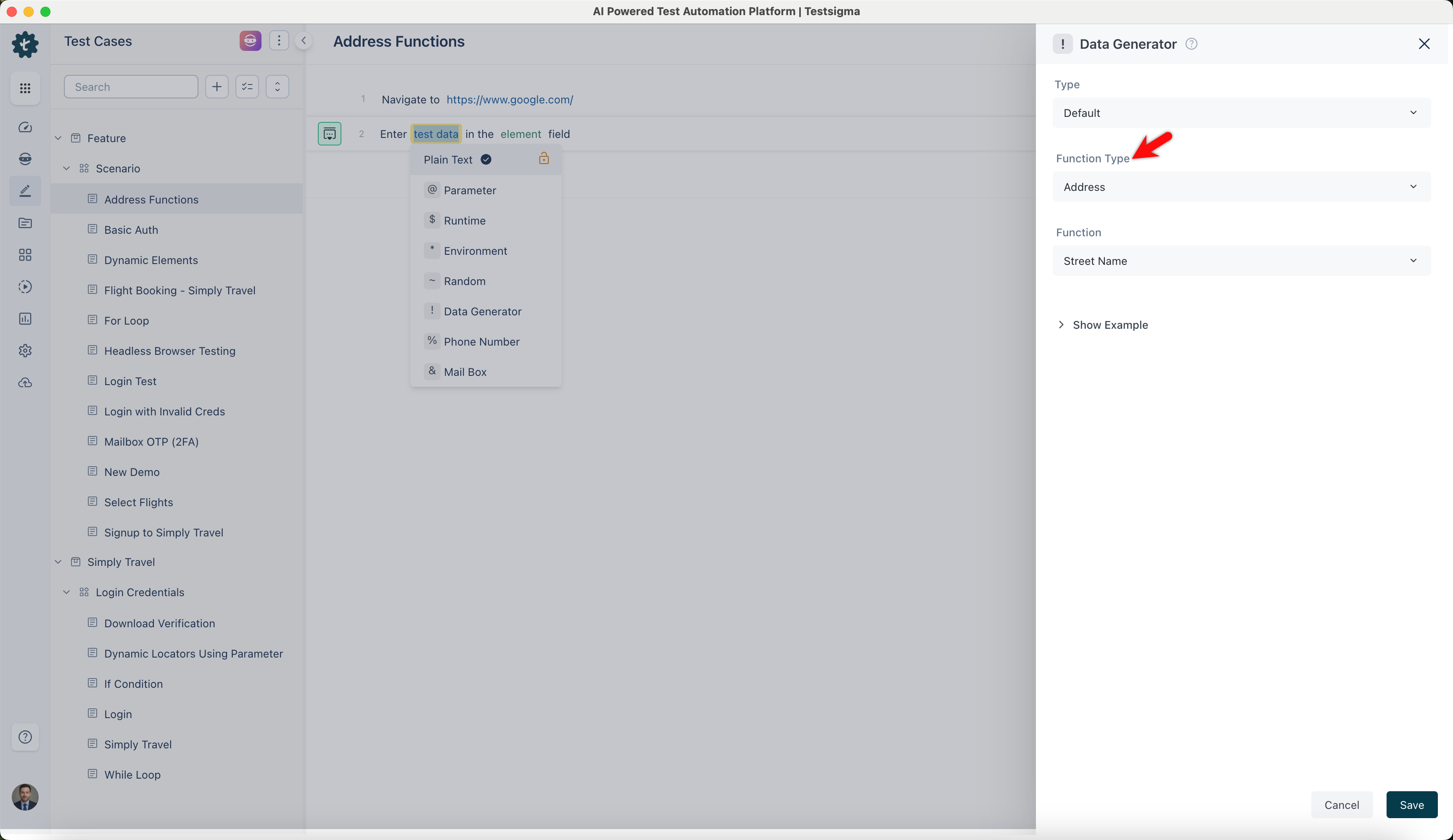
Street Name
Section titled “Street Name”- Allows you to generate realistic street names commonly found in residential or commercial areas.
ℹ️Example:
- Inputs: None (This function does not require any specific input)
- Outputs:
- Willow
- Cedar
- Elm
- Pinecrest
Street Address Number
Section titled “Street Address Number”- Enables you to generate realistic house or building numbers for addresses.
ℹ️Example:
- Inputs: None (This function does not require any specific input)
- Outputs:
- 1234
- 567
- 8901
- 42
Street Address
Section titled “Street Address”- Enables you to generate complete street addresses with or without secondary address components for comprehensive address data creation. Select True in Secondary Address to include secondary address, or select False to exclude it.
ℹ️Example:
| Inputs | Outputs |
|---|---|
| Secondary Address: True | 456 Oak Street, Apt. 12 |
| Secondary Address: True | 789 Pine Avenue, Suite 5B |
| Secondary Address: False | 456 Oak Street |
| Secondary Address: False | 789 Pine Avenue |
Secondary Address
Section titled “Secondary Address”- Enables you to generate realistic secondary address components.
ℹ️Example:
- Inputs: None (This function does not require any specific input)
- Outputs:
- Apt. 12
- Suite 5B
- Unit 301
- Apt. 3C
Zip Code
Section titled “Zip Code”- Allows you to generate random zip codes for various addresses to ensure each address entry has a realistic postal code, aiding in location-specific data handling.
ℹ️Example:
- Inputs: None (This function does not require any specific input)
- Outputs:
- 12345
- 67890
- 90210
- 60601
Zip Code by State
Section titled “Zip Code by State”- Enables you to generate state-specific ZIP codes based on the provided state abbreviation.
ℹ️Example:
| Inputs: State Abbreviation | Outputs: Zip Code |
|---|---|
| CA | 90001 |
| NY | 10001 |
| TX | 73301 |
| FL | 33101 |
Street Suffix
Section titled “Street Suffix”- Allows you to generate street suffixes indicating the type or category of the street, adding specificity to street or names.
ℹ️Example:
- Inputs: None (This function does not require any specific input)
- Outputs:
- Street
- Avenue
- Boulevard
- Lane
Street Prefix
Section titled “Street Prefix”- Enables you to generate a street prefix indicating the type. Providing directional or descriptive prefixes gives more context or direction to the street name.
ℹ️Example:
- Inputs: None (This function does not require any specific input)
- Outputs:
- North
- South
- East
- West
City Suffix
Section titled “City Suffix”- Allows you to generate city suffixes indicating the type to categorize cities or towns based on their characteristics.
ℹ️Example:
- Inputs: None (This function does not require any specific input)
- Outputs:
- Heights
- Village
- Town
- Springs
City Prefix
Section titled “City Prefix”- Enables you to generate a city prefix that indicates the start or characteristic of a city’s name, providing city names to denote direction, location, or historical context.
ℹ️Example:
- Inputs: None (This function does not require any specific input)
- Outputs:
- North
- East
- Old
- West
- Allows you to generates random city names and provides diverse urban area names for various applications that need city data.
ℹ️Example:
- Inputs: None (This function does not require any specific input)
- Outputs:
- New York
- Los Angeles
- Chicago
- Houston
- Enables you to generates random state names. Provides state names for applications that require state-level data.
ℹ️Example:
- Inputs: None (This function does not require any specific input)
- Outputs:
- California
- Texas
- Florida
- New York
State Abbr
Section titled “State Abbr”- Allows you to generate two-letter codes representing states. It provides standardized abbreviations for efficient data handling.
ℹ️Example:
- Inputs: None (This function does not require any specific input)
- Outputs:
- CA
- TX
- FL
- NY
Latitude
Section titled “Latitude”- Enables you to generate random latitude coordinates. It offers geographic coordinates for location-based services and mapping applications.
ℹ️Example:
- Inputs: None (This function does not require any specific input)
- Outputs:
- 34.0522
- 40.7128
- 41.8781
- 29.7604
Longitude
Section titled “Longitude”- Allows you to generate random longitude coordinates. It provides geographic coordinates for precise location-based applications and mapping.
ℹ️Example:
- Inputs: None (This function does not require any specific input)
- Outputs:
- 118.2437
- 74.0060
- 87.6298
- 95.3698
Timezone
Section titled “Timezone”- Enable you to generate time zone names. It provides time zone data for accurate time-related applications and scheduling.
ℹ️Example:
- Inputs: None (This function does not require any specific input)
- Outputs:
- Asia/Baku
- Africa/Lagos
- America/Chicago
- Australia/Sydney
Country
Section titled “Country”- Allows you to generate random country names and provides country names for applications requiring country-level data.
ℹ️Example:
- Inputs: None (This function does not require any specific input)
- Outputs:
- United States
- Canada
- Australia
- Mexico
Country Code
Section titled “Country Code”- Enables you to generate two-letter or three-letter codes that uniquely identify countries. Provides standardized data handling and internationalization for ISO country codes.
ℹ️Example:
- Inputs: None (This function does not require any specific input)
- Outputs:
- US
- CA
- AU
- MX
Building Number
Section titled “Building Number”- Allows you to generates a random building number for address data and ensures that the generated addresses include a realistic building number.
ℹ️Example:
- Inputs: None (This function does not require any specific input)
- Outputs:
- 123
- 789
- 1011
- 565
Full Address
Section titled “Full Address”- Enables you to generate a complete location description including street, city, state, and postal code.
ℹ️Example:
- Inputs: None (This function does not require any specific input)
- Outputs:
- 456 Oak Street, Los Angeles, CA 90001
- 789 Pine Avenue, New York, NY 10001
- 321 Elm Drive, Chicago, IL 60601
- 101 Maple Lane, Houston, TX 77002