
On-Premise Setup
Testsigma's On-Premise Architecture
Physical Layout Deployment Diagram
Section titled “Physical Layout Deployment Diagram”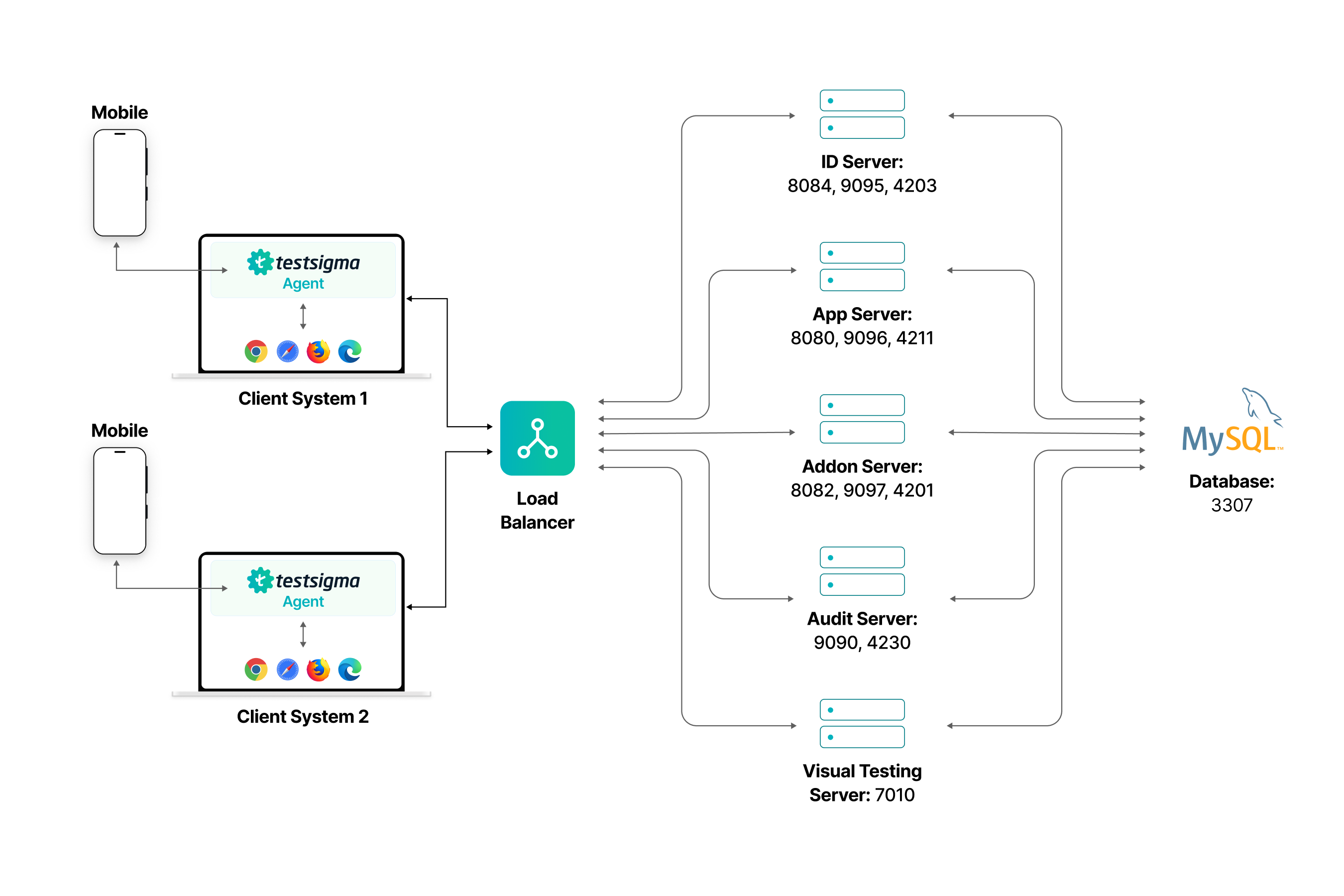
The physical layout deployment diagram above illustrates how tests are created and executed in Testsigma’s on-premise environment.
-
The client systems with the Testsigma Agent installed connect to a load balancer.
-
The load balancer distributes incoming traffic across various containers in the Testsigma Server based on their roles for efficiently handling requests and responses.
-
All the containers communicate with a central database that stores application data.
-
Each container has specific ports for organized and efficient communication within the system.
Important Components
Section titled “Important Components”1. Client Systems:
Section titled “1. Client Systems:”-
Agents:
- Software programs that are installed on each client system for test creation and execution.
- These Agents communicate with test browsers and mobile devices to execute tests, using various ports, including 8383, 8484, 8100, and 5037, and a range from 10000 to 65535.
- The Agents send test results to the Central Server.
-
Browsers:
- Browsers on the Client Systems provide users access to the Testsigma application via a web interface for seamless interaction.
2. Central Server:
Section titled “2. Central Server:”- The Central Server is the main hub of the Testsigma On-Premise System Architecture.
- It processes and stores all data received from the Agents.
- It provides a web interface to access the Testsigma application.
- It communicates with the Database to store and retrieve data and ensures that retrieved data is organized.
- It also offers storage capabilities for data and test results.
3. Database:
Section titled “3. Database:”- The Database is the backbone of data storage within the Testsigma On-Premise System Architecture.
- It stores all relevant information, including test results, user data, and other necessary details. The Database communicates with the Central Server using TCP on port 3307.
Ports Used in Different Containers
Section titled “Ports Used in Different Containers”1. Load Balancer
- Role: Acts as the entry point to the system, distributing incoming traffic among multiple servers to prevent any single server from becoming a bottleneck.
2. ID Server
- Role: Handles user identity, authentication, and authorization services.
- Ports: 8084, 9095, 4203
3. App Server
- Role: Manages the main application logic and user requests.
- Ports: 8080, 9096, 4211
4. Addon Server
- Role: Supports additional features or plugins that extend the main application functionality.
- Ports: 8082, 9097, 4201
5. Audit Server
- Role: Manages logging, monitoring, and auditing of system activities and transactions.
- Ports: 9090, 4230
6. Visual Testing Server
- Role: Handles visual testing tasks, such as UI validation and automated visual regression testing.
- Port: 7010
7. MySQL Database
- Roles:
- Stores all the application data, including user information, transactions, logs, etc.
- Communicates with all servers to provide necessary data access.
- Port: 3307
Interactions
Section titled “Interactions”1. Load Balancer:
- Routes traffic to the ID, App, Addon, Audit, and Visual Testing servers.
2. Servers:
- Each server interacts with the MySQL database to store and retrieve data as needed.