
CI/CD
Integrate Testsigma with your CI/CD using REST API (Generic)
Prerequisites
Before you begin, ensure that you have referred to:
Trigger Test Plans Using API
Section titled “Trigger Test Plans Using API”-
Go to the specific Test Plan Details page in the Testsigma application (for the Test Plan that you want to include in your CI/CD Pipeline)
-
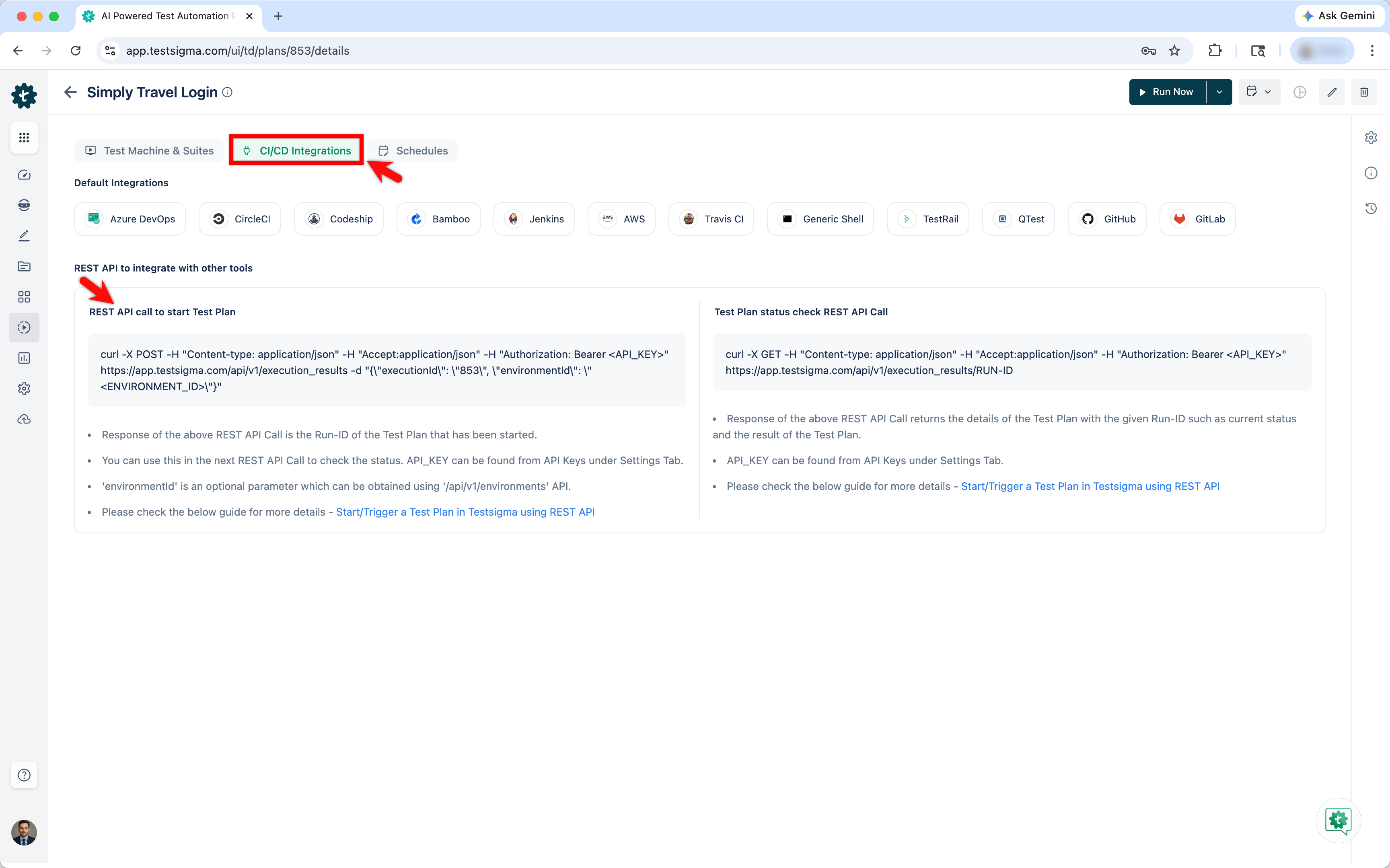
Go to the CI/CD Integrations section on the Test Plan Details page.
-
You will see the CURL request under the REST API to integrate with other tools > REST API call to start Test Plan.
Trigger Tests through CURL request:
Section titled “Trigger Tests through CURL request:”curl -X POST -H "Content-type: application/json"-H "Accept:application/json"-H "Authorization: Bearer <API_KEY>" https://app.testsigma.com/api/v1/execution_results-d "{\"executionId\": \"301\", \"environmentId\": \"<ENVIRONMENT_ID>\"}"You can execute this CURL command in your computer’s command-line interface (CLI).
The same can be done using any other REST API client with the following details:
Section titled “The same can be done using any other REST API client with the following details:”| Request Type | POST |
|---|---|
| Request URL | https://app.testsigma.com/api/v1/execution_results |
| Authorization | Bearer <API_KEY> |
| Content-type | application/json |
| Accept | application/json |
| Request Body | { “executionId”: “<TEST_PLAN_ID>”, “buildNo”: “<BUILD_NO>” “environmentId”: <ENVIRONMENT_ID> } |
-
The <TEST_PLAN_ID> is used to identify the Test Plan which is to be triggered. This can be obtained from the corresponding test plan details page. Refer to the documentation on getting test plan details.
-
The <API_KEY> is used to authenticate your user in Testsigma API. This can be obtained from the Settings > API Keys by creating a new API key. Refer to the documentation on generating API keys.
-
The <BUILD_NO> is the Build number/Version for your corresponding Application Build against which you are running the Tests. This can be obtained from the Dev team or Build Stage in the CI/CD Pipeline.
Check the Status of Test Plan Execution Using API
Section titled “Check the Status of Test Plan Execution Using API”This API can be used to check the status of the Test Plan using GET method once the Test Plan execution is triggered successfully. Make sure to get RUN_ID for the triggered Test Plan.
PERL
curl -X GET -H \"Content-type: application/json\" \\-H \"Accept:application/json\" \\-H \"Authorization: Bearer <API_KEY>\" \\https://app.testsigma.com/api/v1/execution_results/<RUN_ID>";You can execute this CURL command in your computer’s command-line interface (CLI).
The same can be done using any other REST API client with the following details:
Section titled “The same can be done using any other REST API client with the following details:”| Request Type | GET |
|---|---|
| Request URL | https://app.testsigma.com/api/v1/execution_results/<RUN_ID> |
| Authorization | Bearer <API_KEY> |
| Content-type | application/json |
| Accept | application/json |
- The <RUN_ID> can be obtained as the value of the key ‘id’ in the JSON response for the previous API.
- The <API_KEY> can be obtained from the Settings > API_Keys by creating a new API Key.
Executing Tests Plans in Different Environments
Section titled “Executing Tests Plans in Different Environments”To execute a test plan with different Environments, you need to have an Environment ID. You can find the Environment ID by following the steps below.
Get Environment ID
Section titled “Get Environment ID”-
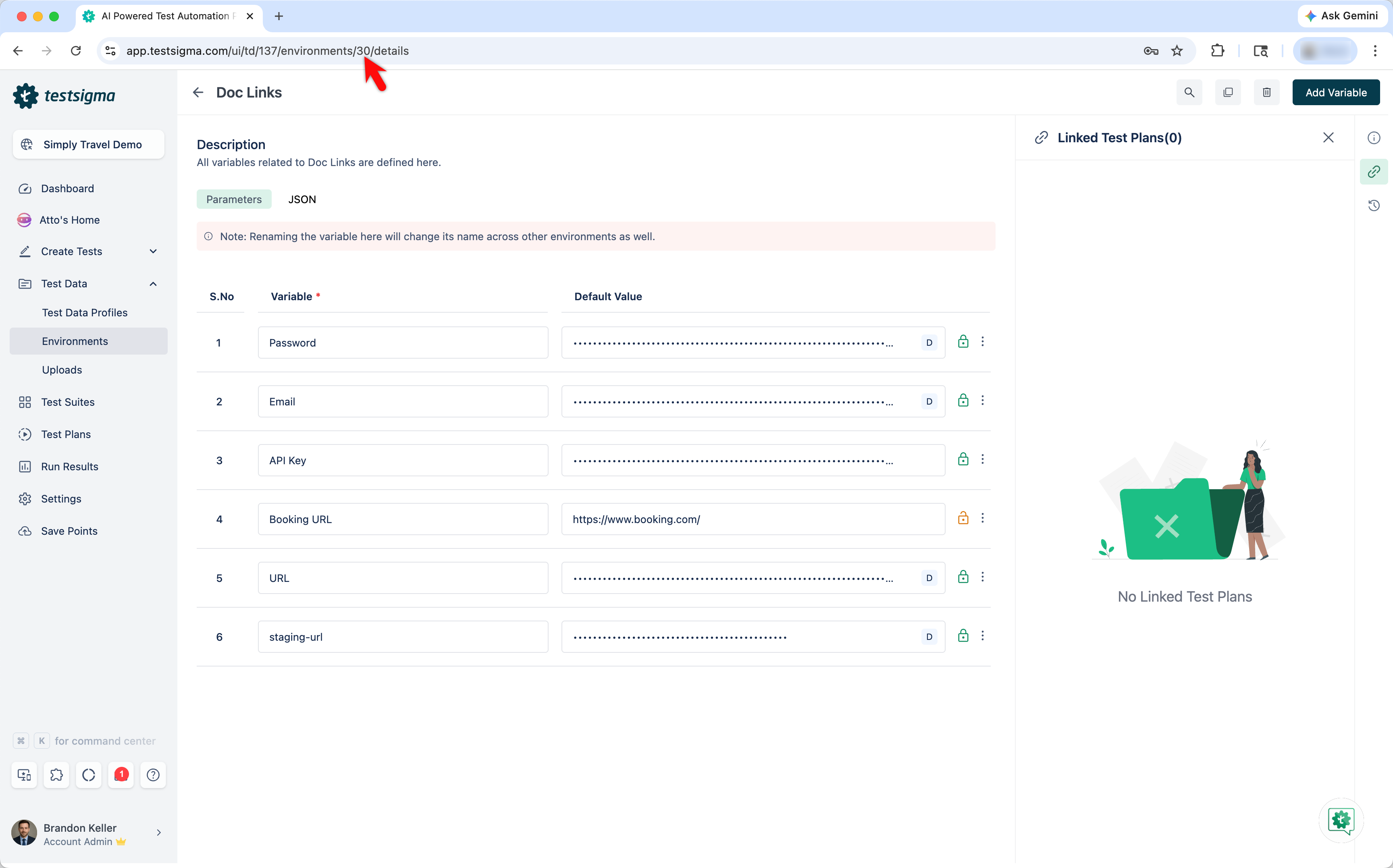
Navigating to Test Data > Environments, and click on an Environment.
-
On the Environment page, the <ENVIRONMENT_ID> in the URL
https://app.testsigma.com/ui/td/88/environments/<ENVIRONMENT_ID>/detailsis the ID of the environment.
- For Example, if the URL is
https://app.testsigma.com/ui/td/88/environments/10/details, the ID is 10.
Executing Tests Plans with Different Environments
Section titled “Executing Tests Plans with Different Environments”-
Navigate to Test Plans > Test Plan > CI/CD Integrations, and copy CURL request under REST API to integrate with other tools > REST API call to start Test Plan.
-
Provide the Environment ID in the request body.
curl -X POST \-H "Content-type: application/json" \-H "Accept:application/json" \-H "Authorization: Bearer <API_KEY>" \https://app.testsigma.com/api/v1/execution_results \-d "{\"executionId\": \"301\", \"environmentId\": \"<ENVIRONMENT_ID>\"}"You can execute this CURL command in your computer’s command-line interface (CLI) to trigger test plan with the environment specific to the given ID.
Script Method
Section titled “Script Method”If you want to start the Execution and then check the execution status in regular intervals you can make use of a generic Shell Script for integrating with any CI/CD tool. Refer to the documentation on generic Shell script.
That’s all we need to automate Test Execution when a successful build is triggered using the CI server.