
Test Data
DateFunctions Function Type
Prerequisites
Before you begin, ensure that you have referred to:
Selecting DateFunctions as a Function Type for Data Generator
Section titled “Selecting DateFunctions as a Function Type for Data Generator”-
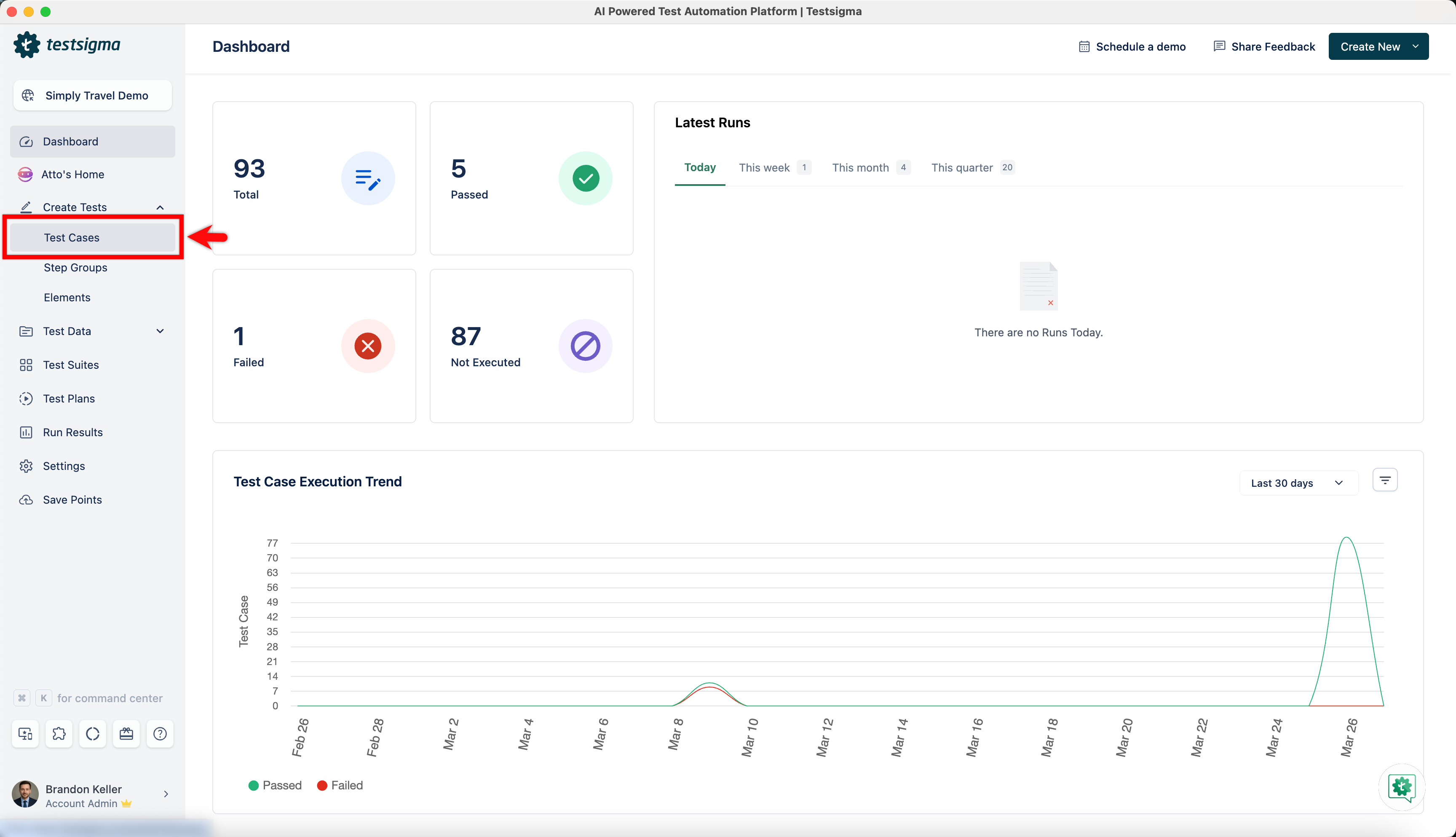
From the left navigation bar, go to Create Tests > Test Cases and create a new test case.
-
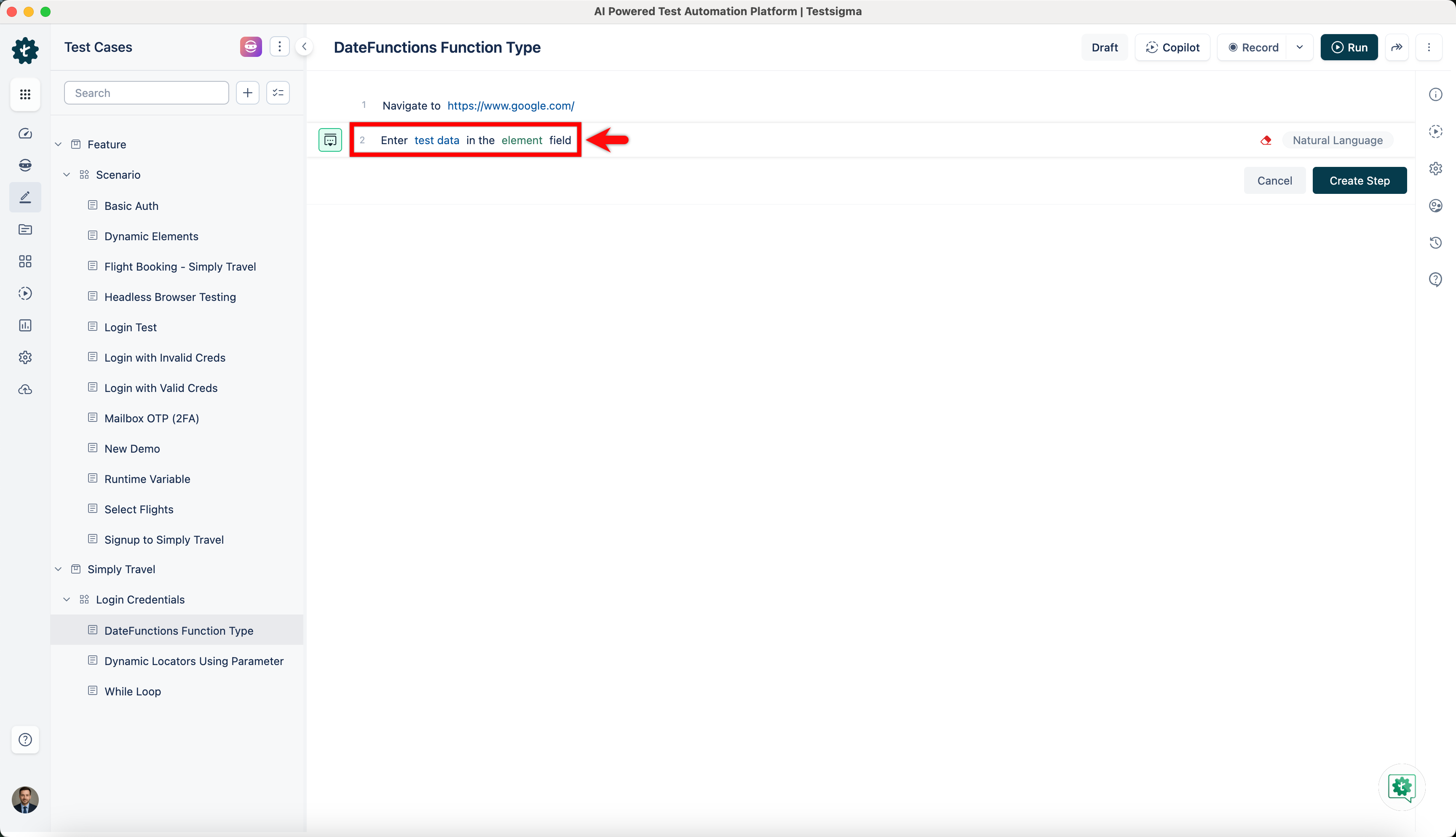
Use NLP to create a new step in the test case and include a placeholder for test data.
-
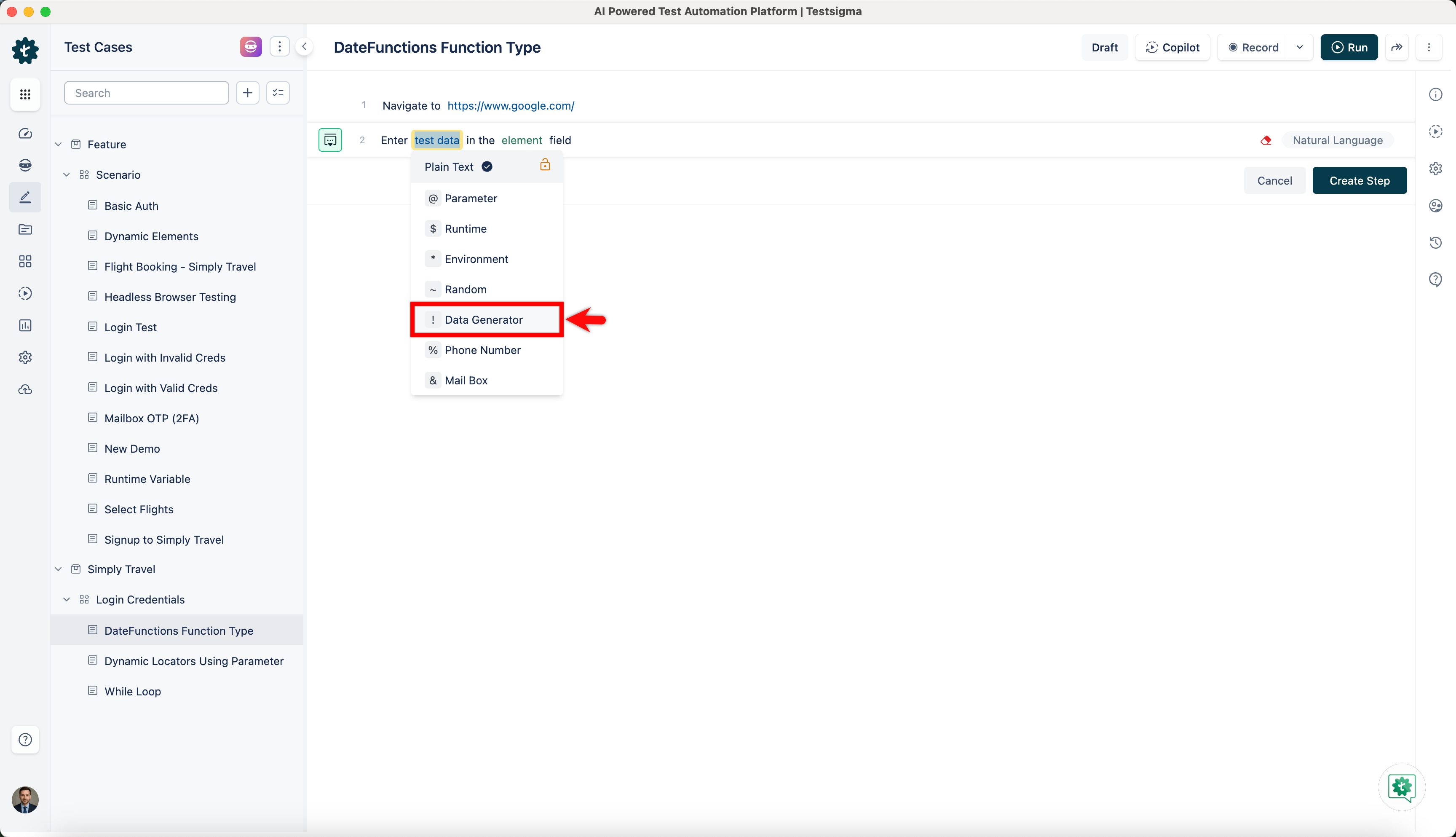
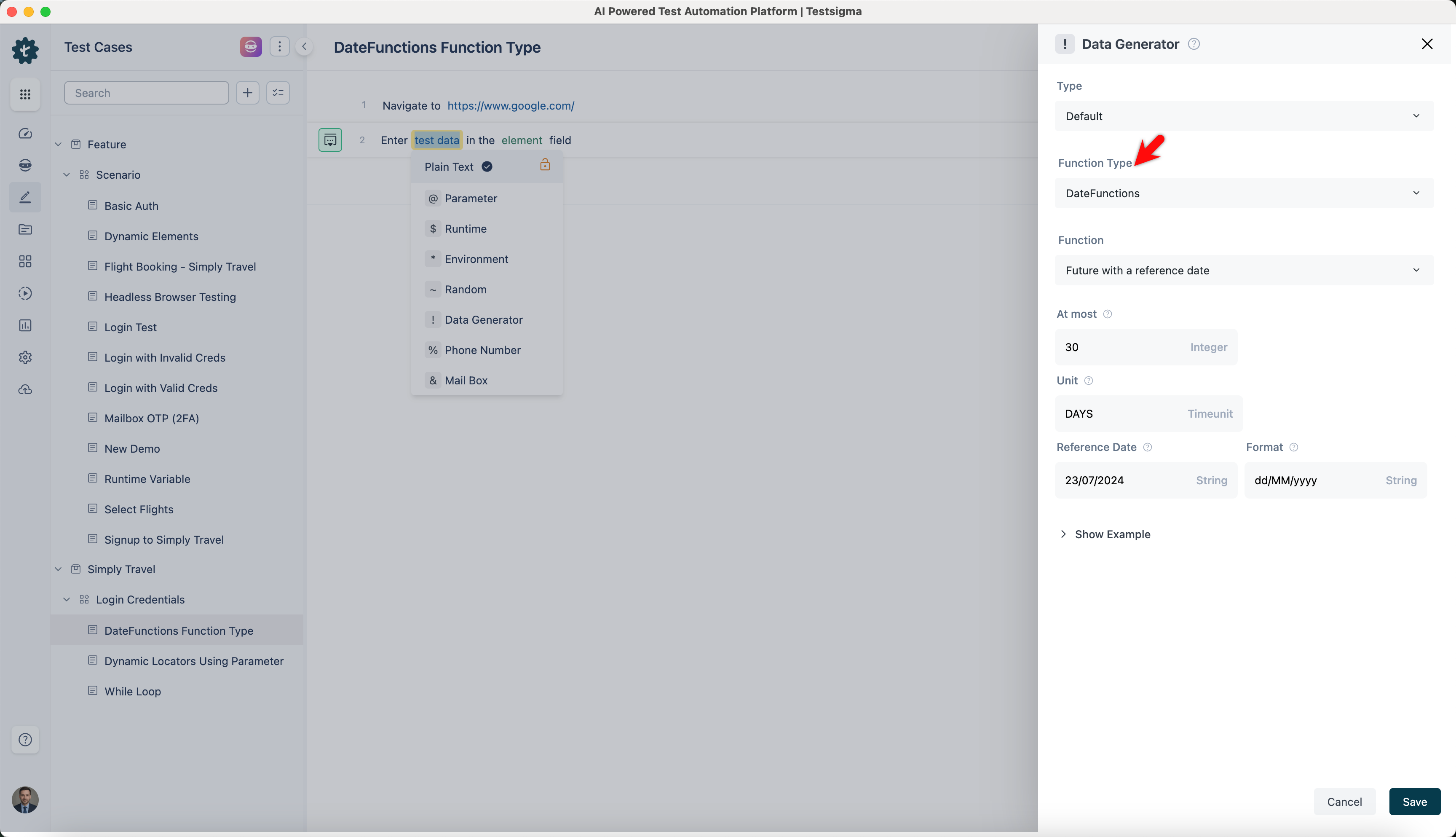
Click on the test data placeholder. From the Test Data Types dropdown menu, select the ! Data Generator option.
-
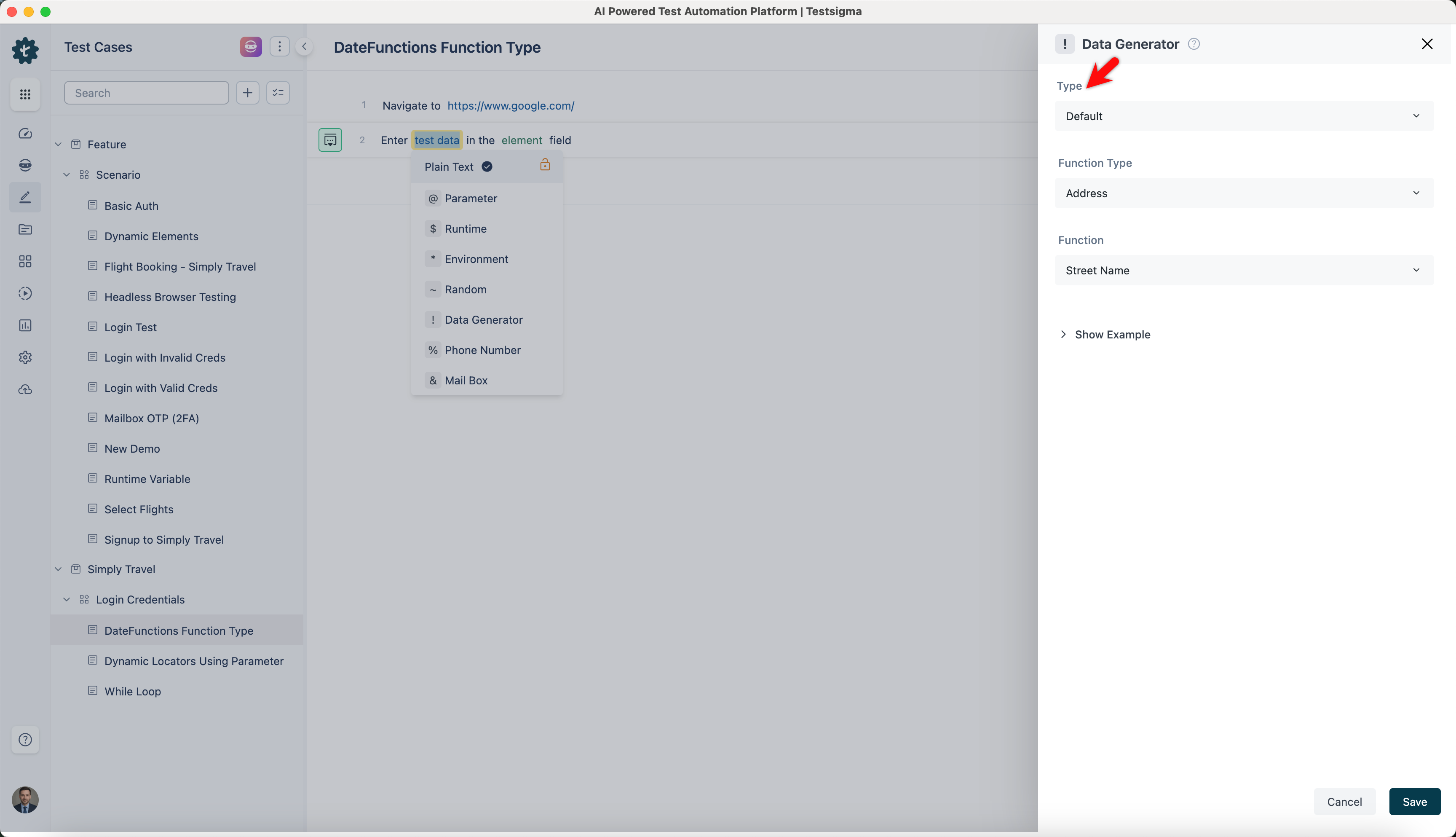
On the ! Data Generators overlay screen, select the Type to Default. This will enable you to use a collection of built-in test data generators.
-
Select DateFunctions from the Function Type dropdown list.
Future
Section titled “Future”- Allows you to generate dates up to a specified number of days in the future from a given reference date.
- Simulating future interactions or events based on a specific starting point, such as upcoming meetings or planned activities, is useful.
| Inputs | Outputs |
|---|---|
| At most: 30 Unit: DAYS Format: dd/MM/yyyy |
15/08/2024 |
| At most: 60 Unit: DAYS Format: dd/MM/yyyy |
08/09/2024 |
| At most: 90 Unit: DAYS Format: dd/MM/yyyy |
14/10/2024 |
| At most: 30 Unit: DAYS Format: dd/MM/yyyy |
09/08/2024 |
Future
Section titled “Future”- Enables you to generate dates up to a specified number of days in the future from today’s date.
- Generate dates for future events or reminders with specifying a reference date, making it ideal.
| Inputs | Outputs |
|---|---|
| At most: 30 Unit: DAYS Reference Date: 10/07/2024 Format: dd/MM/yyyy |
15/08/2024 |
| At most: 60 Unit: DAYS Reference Date: 10/07/2024 Format: dd/MM/yyyy |
08/09/2024 |
| At most: 90 Unit: DAYS Reference Date: 10/07/2024 Format: dd/MM/yyyy |
14/10/2024 |
| At most: 30 Unit: DAYS Reference Date: 10/07/2024 Format: dd/MM/yyyy |
09/08/2024 |
Current
Section titled “Current”- Allows you to generate today’s date in the specified format.
- This is useful when timestamping, or a specific format requires today’s date.
Here’s a comprehensive example using the provided code template. The examples for all DateFunctions are presented in a tabular format:
| Inputs | Outputs |
|---|---|
| Format: dd/MM/yyyy | 20/07/2024 |
| Format: dd/MM/yyyy | 16/07/2024 |
| Format: dd/MM/yyyy | 30/04/2020 |
| Format: dd/MM/yyyy | 12/12/2024 |
Between
Section titled “Between”- Enables you to generate dates within a specified range.
- It is helpful in scenarios where you need to generate dates for a defined period, such as scheduling appointments or analyzing trends within a specific timeframe.
| Inputs | Outputs |
|---|---|
| From: 01/01/2022 To: 31/12/2022 Format: dd/MM/yyyy |
14/05/2022 |
| From: 01/01/2022 To: 31/12/2022 Format: dd/MM/yyyy |
22/08/2022 |
| From: 01/01/2022 To: 31/12/2022 Format: dd/MM/yyyy |
11/11/2022 |
| From: 01/01/2022 To: 31/12/2022 Format: dd/MM/yyyy |
02/03/2022 |
- Allows you to generate past dates relative to the current date.
- This function helps create historical records, such as back at events or unanalyzed over a past period.
Here’s a comprehensive example using the provided code template. The examples for all DateFunctions are presented in a tabular format:
| Inputs | Outputs |
|---|---|
| At most: 60 Unit: DAYS Format: dd/MM/yyyy |
11/05/2024 |
| At most: 30 Unit: DAYS Format: dd/MM/yyyy |
16/06/2024 |
| At most: 60 Unit: DAYS Format: dd/MM/yyyy |
17/05/2024 |
| At most: 90 Unit: DAYS Format: dd/MM/yyyy |
17/04/2024 |
- Allows you to generate past dates relative to a specified reference date.
- It is ideal when you need to anchor your past dates to a specific point in time, which can be helpful for historical simulations or data analysis starting from a particular date.
| Inputs | Outputs |
|---|---|
| At most: 30 Unit: DAYS Reference Date: 10/07/2024 Format: dd/MM/yyyy |
15/08/2024 |
| At most: 60 Unit: DAYS Reference Date: 10/07/2024 Format: dd/MM/yyyy |
08/09/2024 |
| At most: 90 Unit: DAYS Reference Date: 10/07/2024 Format: dd/MM/yyyy |
14/10/2024 |
| At most: 30 Unit: DAYS Reference Date: 10/07/2024 Format: dd/MM/yyyy |
09/08/2024 |
Birthday
Section titled “Birthday”- Allows you to generate random dates formatted as birthdays.
- Ideal for scenarios that require random date generation, such as populating test data or simulating user profiles with birthdates.
| Inputs | Outputs |
|---|---|
| Offset: 30 Format: dd/MM/yyyy |
16/07/1994 |
| Offset: 25 Format: dd/MM/yyyy |
16/07/1999 |
| Offset: 40 Format: dd/MM/yyyy |
16/07/1984 |
| Offset: 18 Format: dd/MM/yyyy |
16/07/2006 |
Date Before Today
Section titled “Date Before Today”- Allows you to generate a date of a specified number of days before today.
- Generating historical dates relative to the current date is helpful for data analysis or scheduling based on past events.
| Inputs | Outputs |
|---|---|
| Unit: DAYS Format: dd/MM/yyyy |
16/06/2024 |
| Unit: DAYS Format: dd/MM/yyyy |
17/05/2024 |
| Unit: DAYS Format: dd/MM/yyyy |
17/04/2024 |
| Unit: DAYS Format: dd/MM/yyyy |
01/06/2024 |
Date After Today
Section titled “Date After Today”- Allows you to generate a date that is a specified number of days after today’s date.
- You can use it to calculate future dates relative to the current date, such as when you schedule future tasks or events.
| Inputs | Outputs |
|---|---|
| Unit: DAYS Format: dd/MM/yyyy |
15/08/2024 |
| Unit: DAYS Format: dd/MM/yyyy |
14/09/2024 |
| Unit: DAYS Format: dd/MM/yyyy |
14/10/2024 |
| Unit: DAYS Format: dd/MM/yyyy |
30/08/2024 |
Date Before Given Today
Section titled “Date Before Given Today”- Allows you to generate a date that is a specified number of days before a given reference date.
- It is helpful for scenarios where you need to calculate deadlines or events relative to a specific date in the past.
| Inputs | Outputs |
|---|---|
| Unit: DAYS Reference Date: 10/07/2024 Format: dd/MM/yyyy |
10/06/2024 |
| At most: 60 Unit: DAYS Reference Date: 10/07/2024 Format: dd/MM/yyyy |
11/05/2024 |
| At most: 90 Unit: days Reference Date: 10/07/2024 Format: dd/MM/yyyy |
11/04/2024 |
| At most: 45 Unit: DAYS Reference Date: 10/07/2024 Format: dd/MM/yyyy |
26/05/2024 |
Date After Given Today
Section titled “Date After Given Today”- Allows you to generate a date that is a specified number of days after a given reference date.
- It helps project dates or events forward from a specific reference point, such as milestones or project deadlines.
| Inputs | Outputs |
|---|---|
| At most: 30 Unit: DAYS Reference Date: 10/07/2024 Format: dd/MM/yyyy |
09/08/2024 |
| At most: 60 Unit: DAYS Reference Date: 10/07/2024 Format: dd/MM/yyyy |
08/09/2024 |
| At most: 90 Unit: DAYS Reference Date: 10/07/2024 Format: dd/MM/yyyy |
08/10/2024 |
| At most: 45 Unit: DAYS Reference Date: 10/07/2024 Format: dd/MM/yyyy |
24/08/2024 |