
Test Data
MailboxFunctions Function Type
Prerequisites
Before you proceed, ensure that you have referred to:
- Documentation on creating test plans.
- Documentation on creating test suites.
- Documentation on creating test machines.
- Documentation on adding MailBoxFunctions for accessing and manipulating email content and metadata.
Selecting MailboxFunctions as a Function Type for Data Generator
Section titled “Selecting MailboxFunctions as a Function Type for Data Generator”-
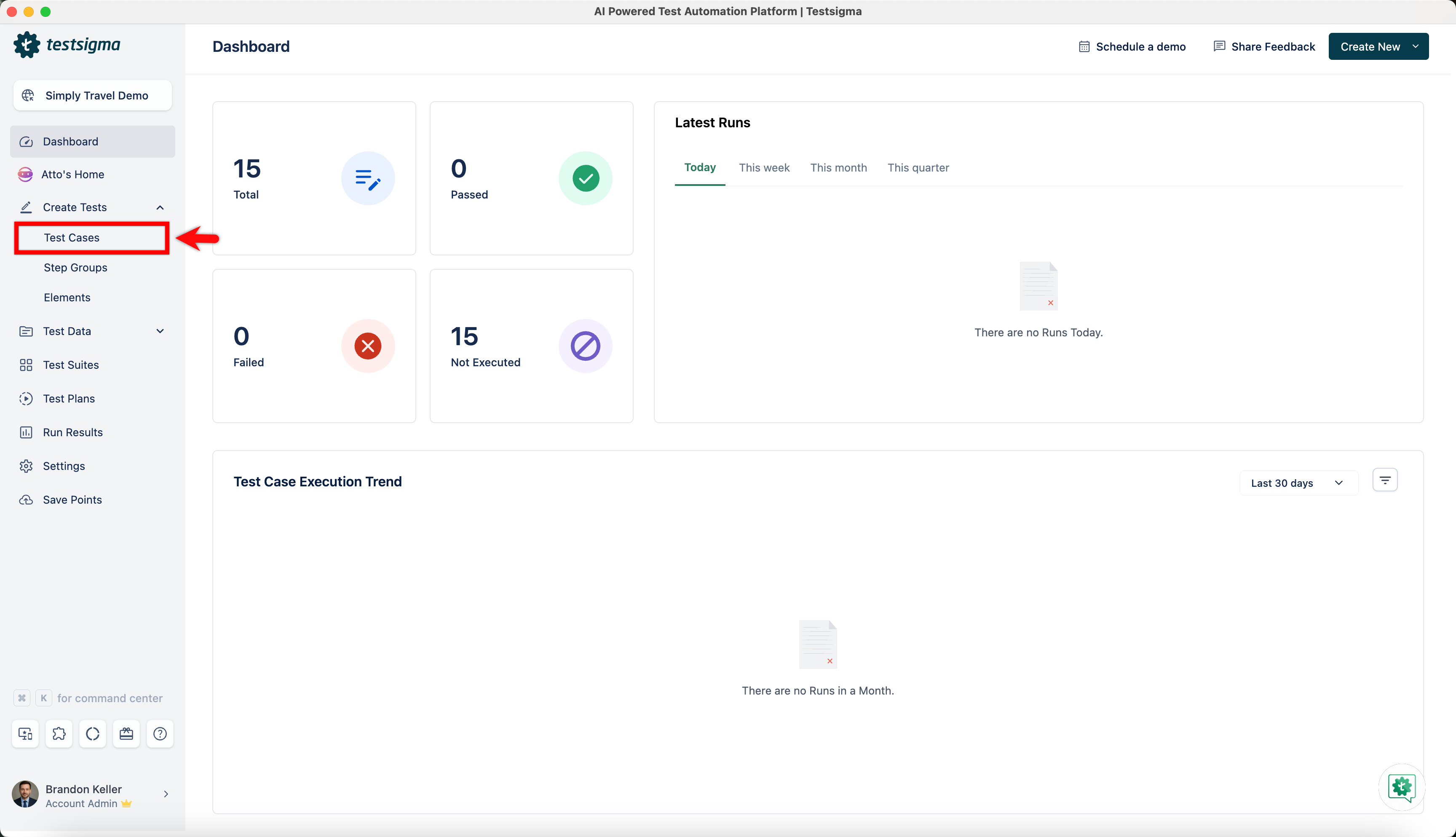
From the left navigation bar, go to Create Tests > Test Cases and create a new test case.
-
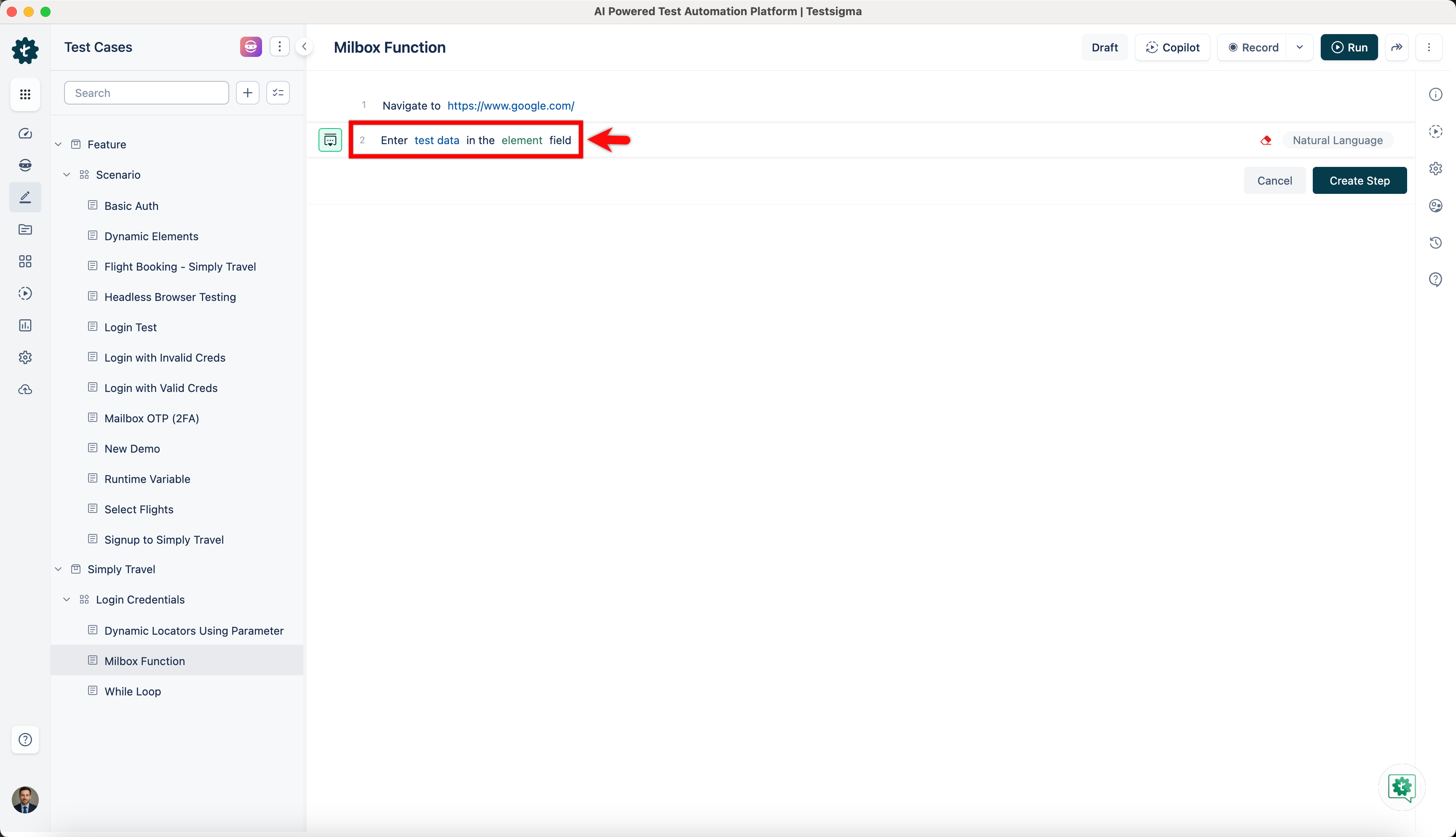
Use NLP to create a new step in the test case and include a placeholder for test data.
-
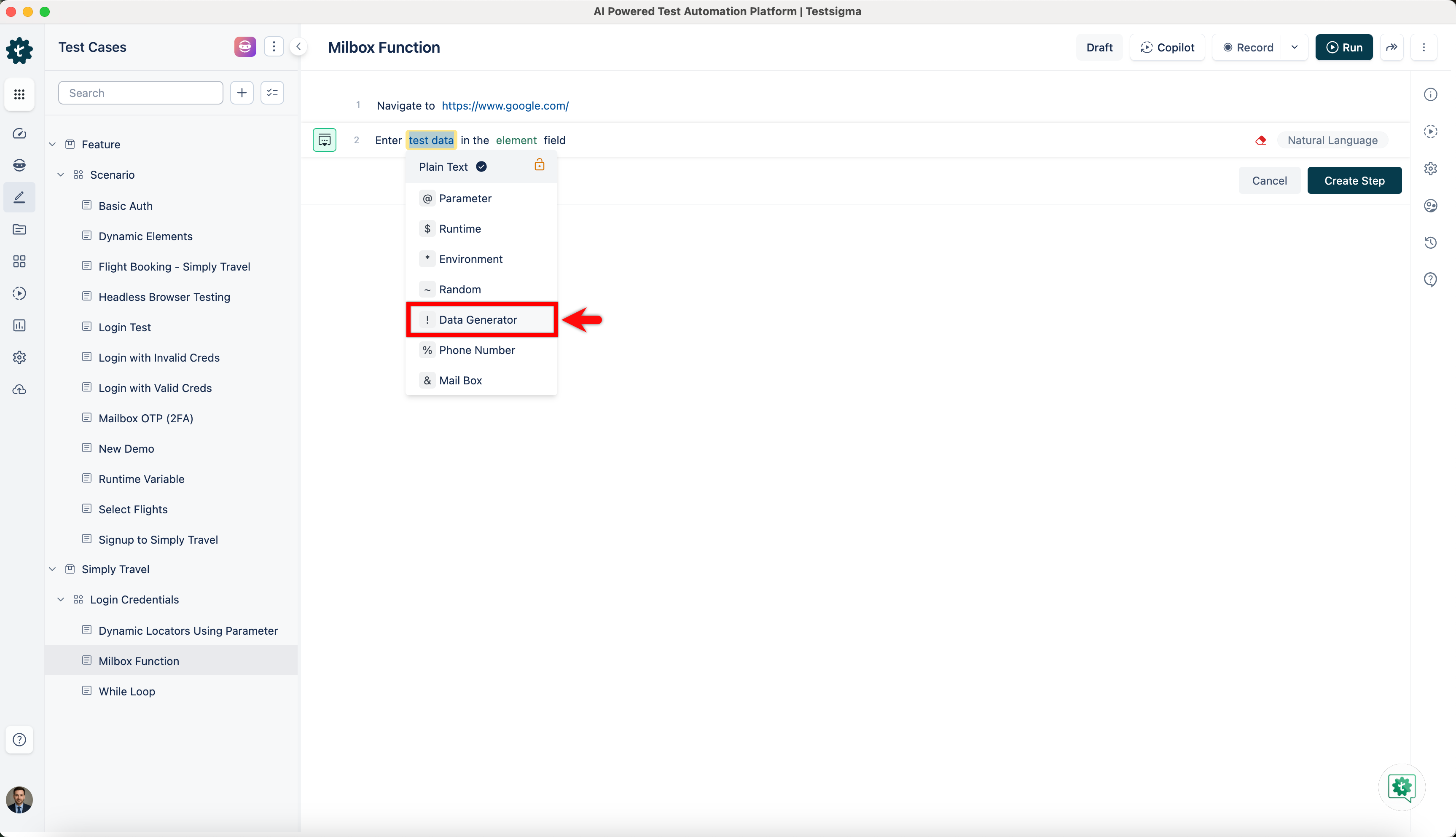
Click on the test data placeholder. From the Test Data Types dropdown menu, select the ! Data Generator option.
-
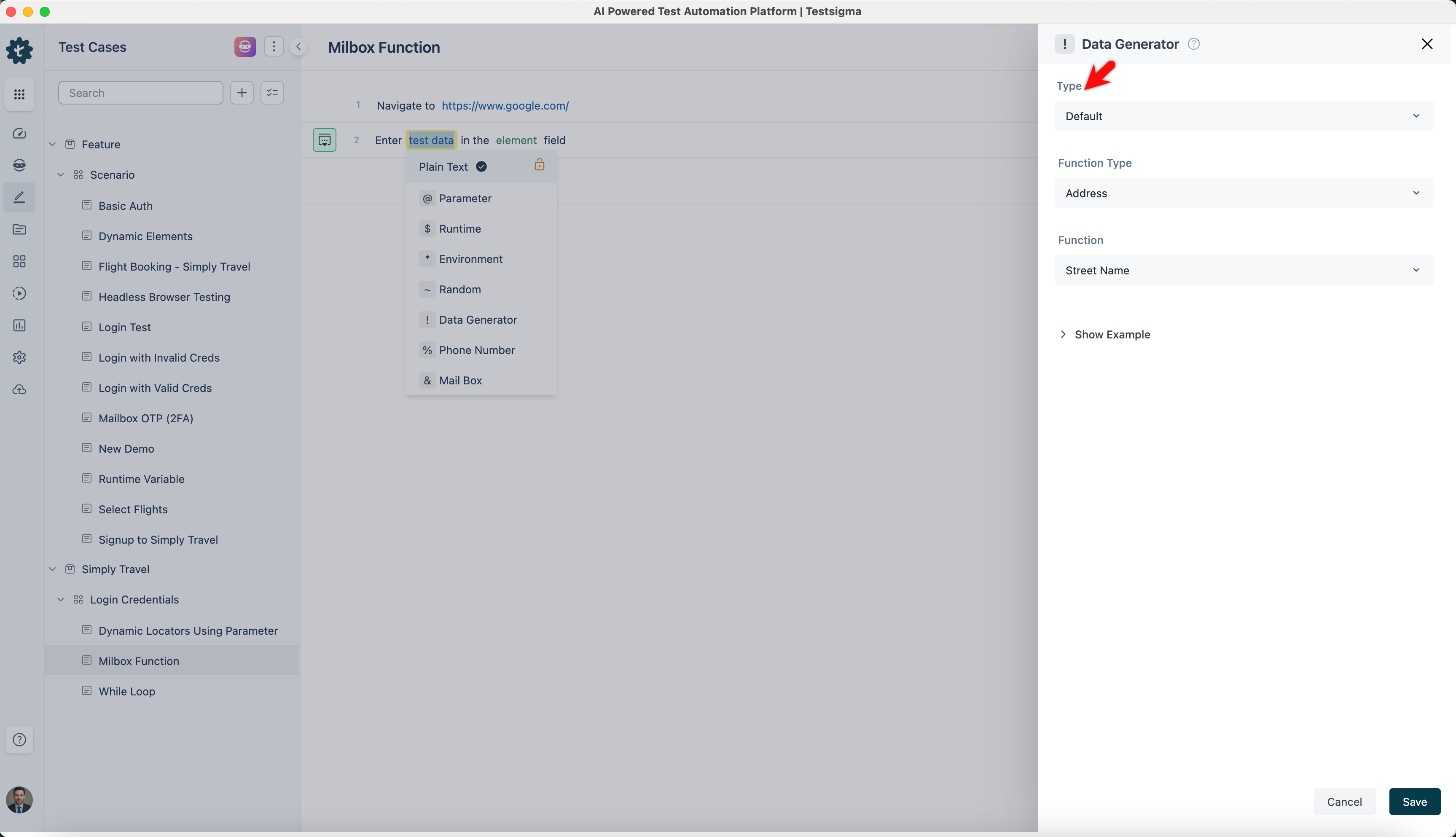
On the ! Data Generators overlay screen, select the Type to Default. This will enable you to use a collection of built-in test data generators.
-
Select MailboxFunctions from the Function Type dropdown list.
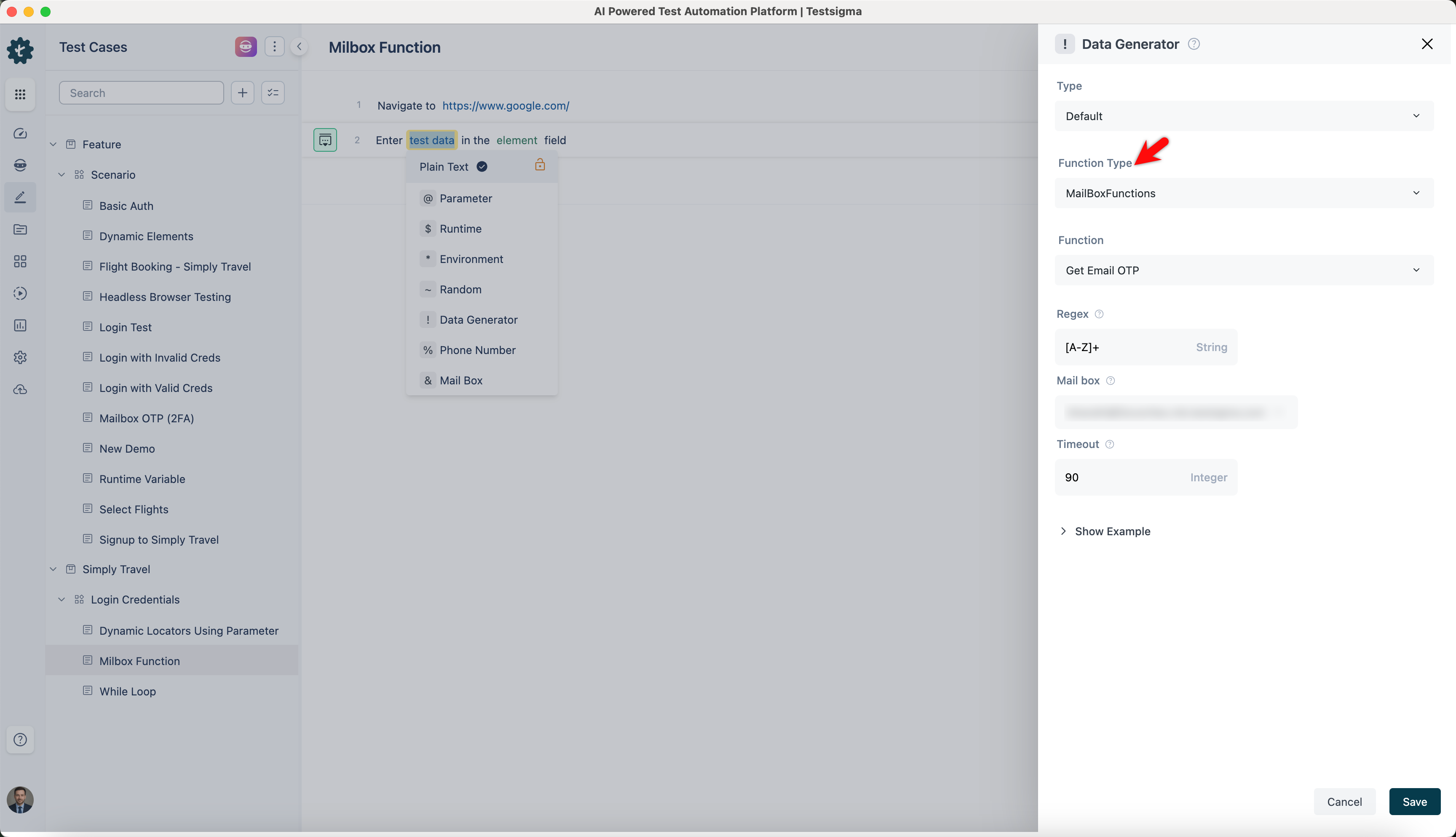
Get Email OTP
Section titled “Get Email OTP”- Enables you to retrieve OTP emails that match a specified regular expression from the configured mailbox within a defined timeout.
ℹ️Examples:
| Input | Output |
|---|---|
| Regex: \d{4} Select MailBox Timeout: 60 |
1234 |
| Regex: \d{6} Select MailBox Timeout: 120 |
987654 |
| Regex: \d{5} Select MailBox Timeout: 90 |
54321 |
| Regex: \d{4,6} Select MailBox Timeout: 180 |
1234, 56789, 456789 |
Get Link from Content
Section titled “Get Link from Content”- Allows you to extract URLs from email content using a provided regular expression within the specified mailbox and timeout duration.
ℹ️Examples:
| Input | Output |
|---|---|
| Regex: \bhttps:\/\/example\.com\b Select MailBox Timeout: 60 |
https://example.com |
| Regex: \bhttp:\/\/test\.com\/\w+ select MailBox Timeout: 120 |
http://test.com/12345 |
| Regex: \bhttps:\/\/www\.website\.com\/\w+ Select MailBox Timeout: 90 |
https://www.website.com/page123 |
| Regex: \bhttps:\/\/\w+\.com\/\w+ Select MailBox Timeout: 180 |
https://example.com/page1, https://test.com/12345, https://anotherwebsite.com/home |
Subject Verification
Section titled “Subject Verification”- Enables you to verify if email subjects match a given regular expression within the configured mailbox and timeout period.
ℹ️Examples:
| Input | Output |
|---|---|
| Regex: \bSubject: Order #[0-9]+\b Select MailBox Compare String: Subject: Order #12345 Timeout: 60 |
true |
| Regex: \bSubject: OTP - [0-9]{4}\b Select MailBox Compare String: Subject: OTP - 5678 Timeout: 120 |
true |
| Regex: \bSubject: Invitation to event\b Select MailBox Compare String: Subject: Invitation to event Timeout: 90 |
true |
| Regex: \bSubject: Verification Code: [0-9]{6}\b, Select MailBox, Compare String: Subject: Verification Code: 123456, Timeout: 180 |
true |
Content Verification
Section titled “Content Verification”- Allows you to validate if email content matches a specified regular expression within the selected mailbox and timeout duration.
ℹ️Examples for contentVerification Function:
| Input | Output |
|---|---|
| Regex: \bOrder #[0-9]+\b Select MailBox Compare String: Order #12345 Timeout: 60 |
true |
| Regex: \bOTP - [0-9]{4}\b Select MailBox Compare String: OTP - 5678 Timeout: 120 |
true |
| Regex: \bInvitation to event\b Select MailBox Compare String: Invitation to event Timeout: 90 |
true |
| Regex: \bVerification Code: [0-9]{6}\b Select MailBox Compare String: Verification Code: 123456 Timeout: 180 |
true |
Get Email Content
Section titled “Get Email Content”- Enables you to retrieve the content of the latest email in the configured mailbox within the specified timeout.
ℹ️Examples for getEmailContent Function:
| Input | Output |
|---|---|
| Select MailBox Timeout: 60 |
Email content from MailBox |
| Select MailBox Timeout: 120 |
Email content from MailBox |
| Select MailBox Timeout: 90 |
Email content from MailBox |
| Select MailBox Timeout: 180 |
Email content from MailBox |
Get Email Subject
Section titled “Get Email Subject”- Allows you to fetch the subject line of the latest email from the specified mailbox within the given timeout.
ℹ️Examples:
| Input | Output |
|---|---|
| Select MailBox Timeout: 60 |
Email subject from MailBox |
| Select MailBox Timeout: 120 |
Email subject from MailBox |
| Select MailBox Timeout: 90 |
Email subject from MailBox |
| Select MailBox Timeout: 180 |
Email subject from MailBox |
Get Url with Text
Section titled “Get Url with Text”- Enables you to retrieve URLs containing a specified text from emails in the configured mailbox within the timeout period.
ℹ️Examples for getUrlWithText Function:
| Input | Output |
|---|---|
| Text: Click here for more info Select MailBox Timeout: 60 |
URL linked to "Click here for more info" from MailBox |
| Text: Visit our website Select MailBox Timeoutv: 120 |
URL linked to "Visit our website" from MailBox |
| Text: Check out the new products Select MailBox Timeout: 90 |
URL linked to "Check out the new products" from MailBox |
| Text: Click here or here for updates Select MailBox Timeout: 180 |
URLs linked to "Click here or here for updates" from MailBox |
URL which contains
Section titled “URL which contains”- Allows you to fetch URLs that include a provided substring from emails in the selected mailbox within the timeout.
ℹ️Examples for getUrlContains Function:
| Input | Output |
|---|---|
| Substring: more info Select MailBox Timeout: 60 |
URLs containing "more info" MailBox |
| Substring: website Select MailBox Timeout: 120 |
URLs containing "website" from MailBox |
| Substring: products Select MailBox Timeout: 90 |
URLs containing "products" from MailBox |
| Substring: updates Select MailBox Timeout: 180 |
URLs containing "updates" from MailBox |
URL matching regex
Section titled “URL matching regex”- Enables you to retrieve URLs matching a specified regular expression pattern from emails in the configured mailbox within the timeout period.
ℹ️Examples for getUrlContains Function:
| Input | Output |
|---|---|
| Regex: \d{4} Select MailBox Timeout: 60 |
URLs containing numbers (e.g., 1234) from MailBox within 60 |
| Regex: \w{6} Select MailBox Timeout: 120 |
URLs containing alphanumeric strings (e.g., abc123) from MailBox within 120 |
| Regex: https? Select MailBox Timeout: 90 |
URLs starting with "http" or "https" from MailBox within 90 |
| Regex: \.com$ Select MailBox Timeout: 180 |
URLs ending with ".com" from MailBox within 180 |
Get Sender Email
Section titled “Get Sender Email”- Allows you to retrieve the email address of the sender from an email message by using it to extract the sender email address from the latest email in the inbox.
ℹ️Examples:
| Input | Output |
|---|---|
| Select MailBoxFunctions Timeout: 60 seconds |
sender1@example.com |
| Select MailBoxFunctions Timeout: 120 seconds |
sender2@example.com |
| Select MailBoxFunctions Timeout: 90 seconds |
sender3@example.com |
| Select MailBoxFunctions Timeout: 180 seconds |
sender4@example.com |
Get Sender Name
Section titled “Get Sender Name”- Enables you to fetch the name of the sender from an email message. Identify the name of the sender from the most recent email.
ℹ️Examples:
| Input | Output |
|---|---|
| Select MailBoxFunctions Timeout: 60 seconds |
John Doe |
| Select MailBoxFunctions Timeout: 120 seconds |
Jane Smith |
| Select MailBoxFunctions Timeout: 90 seconds |
Alice Johnson |
| Select MailBoxFunctions Timeout: 180 seconds |
Bob Brown |