
Test Data
MailboxAliasFunctions Function Type
Prerequisites
Before you begin, ensure that you have referred to:
- Documentation on creating test cases.
- Documentation on creating test steps.
- Documentation on adding data generators in test steps.
- Documentation on creating mailboxfunctions for accessing and manipulating email content and metadata.
Selecting MailboxAliasFunctions as a Function Type for Data Generator
Section titled “Selecting MailboxAliasFunctions as a Function Type for Data Generator”-
From the left navigation bar, go to Create Tests > Test Cases and create a new test case.
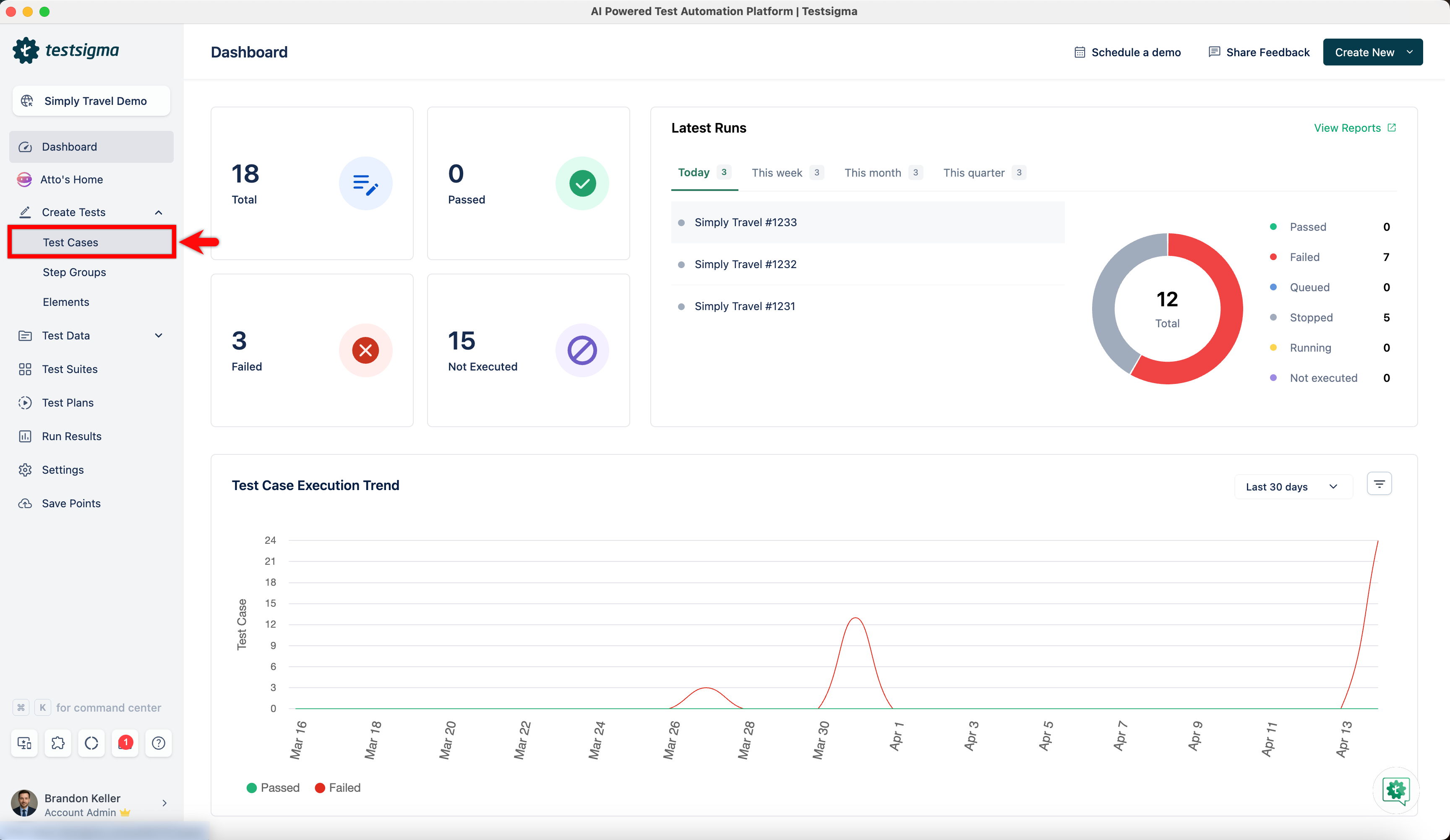
-
Use NLP to create a new step in the test case and include a placeholder for test data.
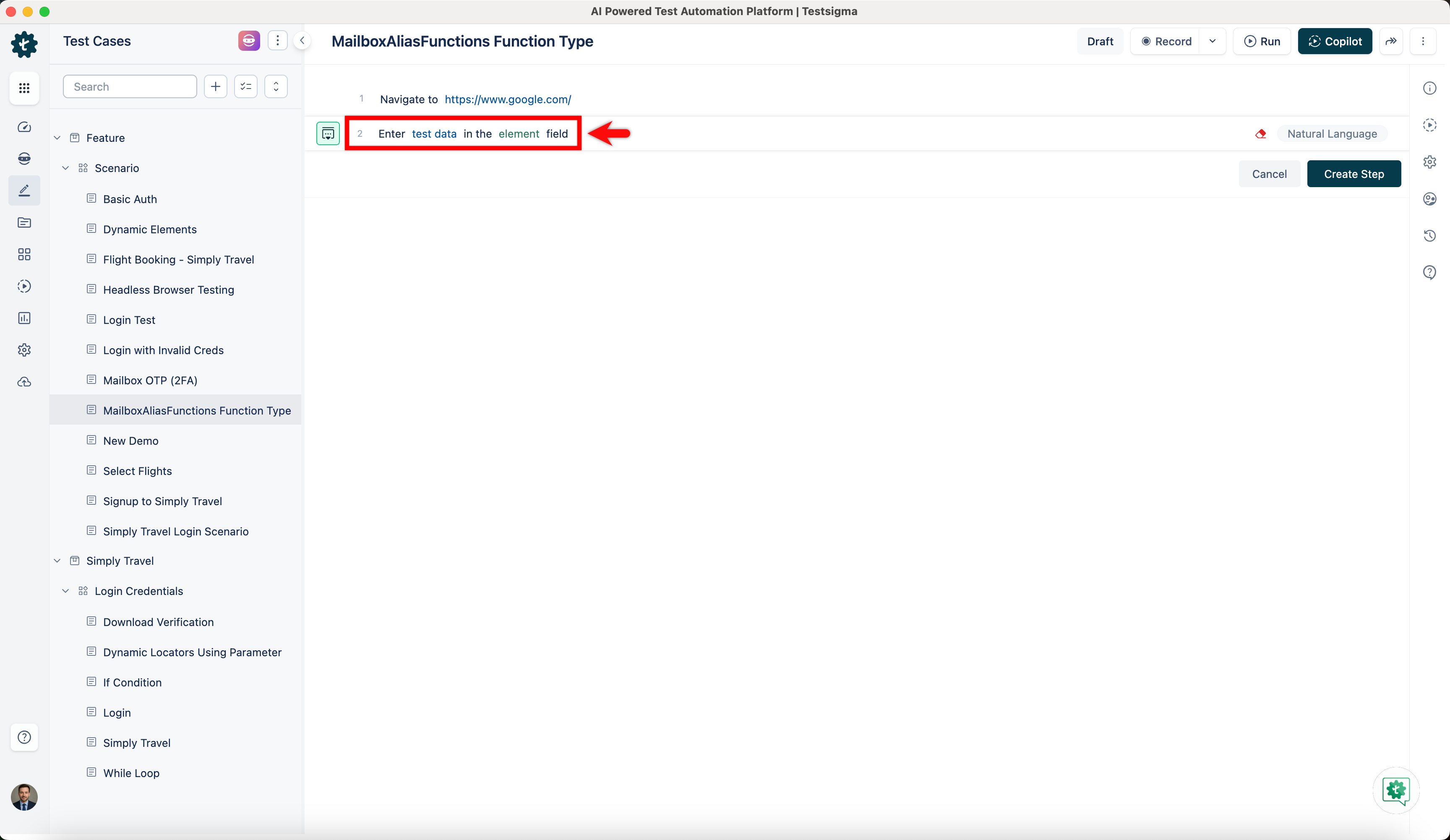
-
Click on the test data placeholder. From the Test Data Types dropdown menu, select the ! Data Generator option.
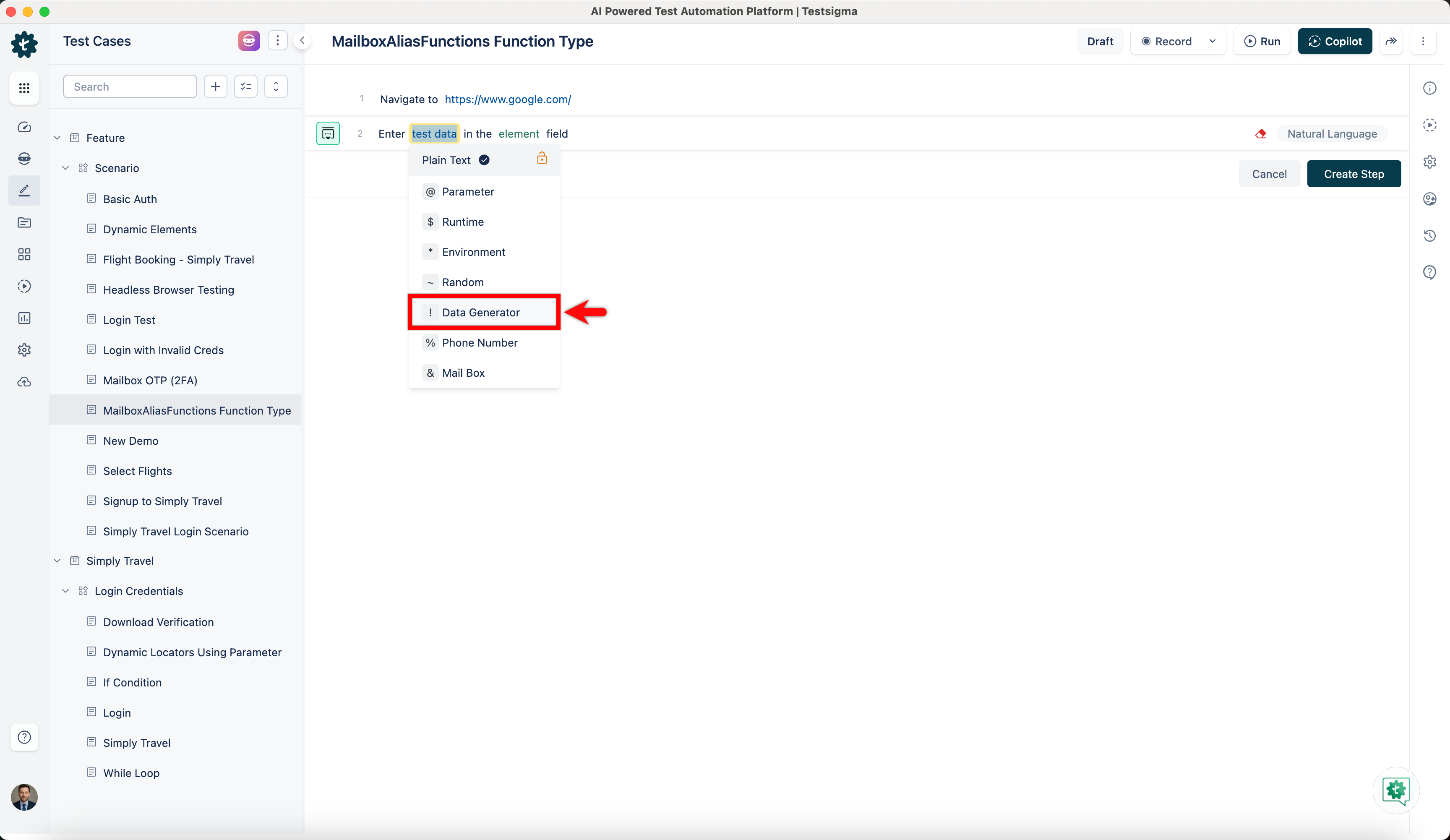
-
On the ! Data Generators overlay screen, select the Type to Default. This will enable you to use a collection of built-in test data generators.
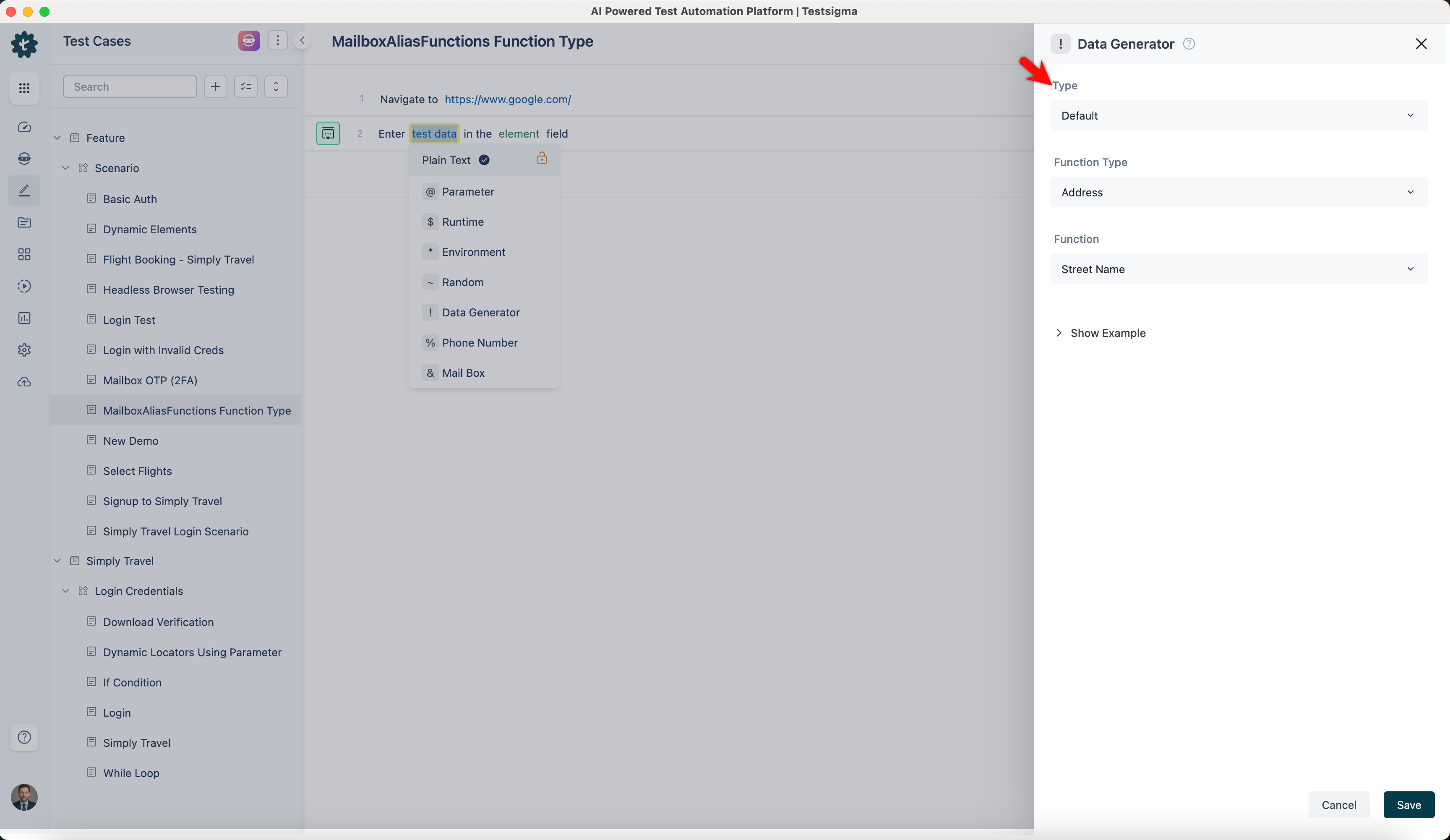
-
Select MailboxAliasFunctions from the Function Type dropdown list.
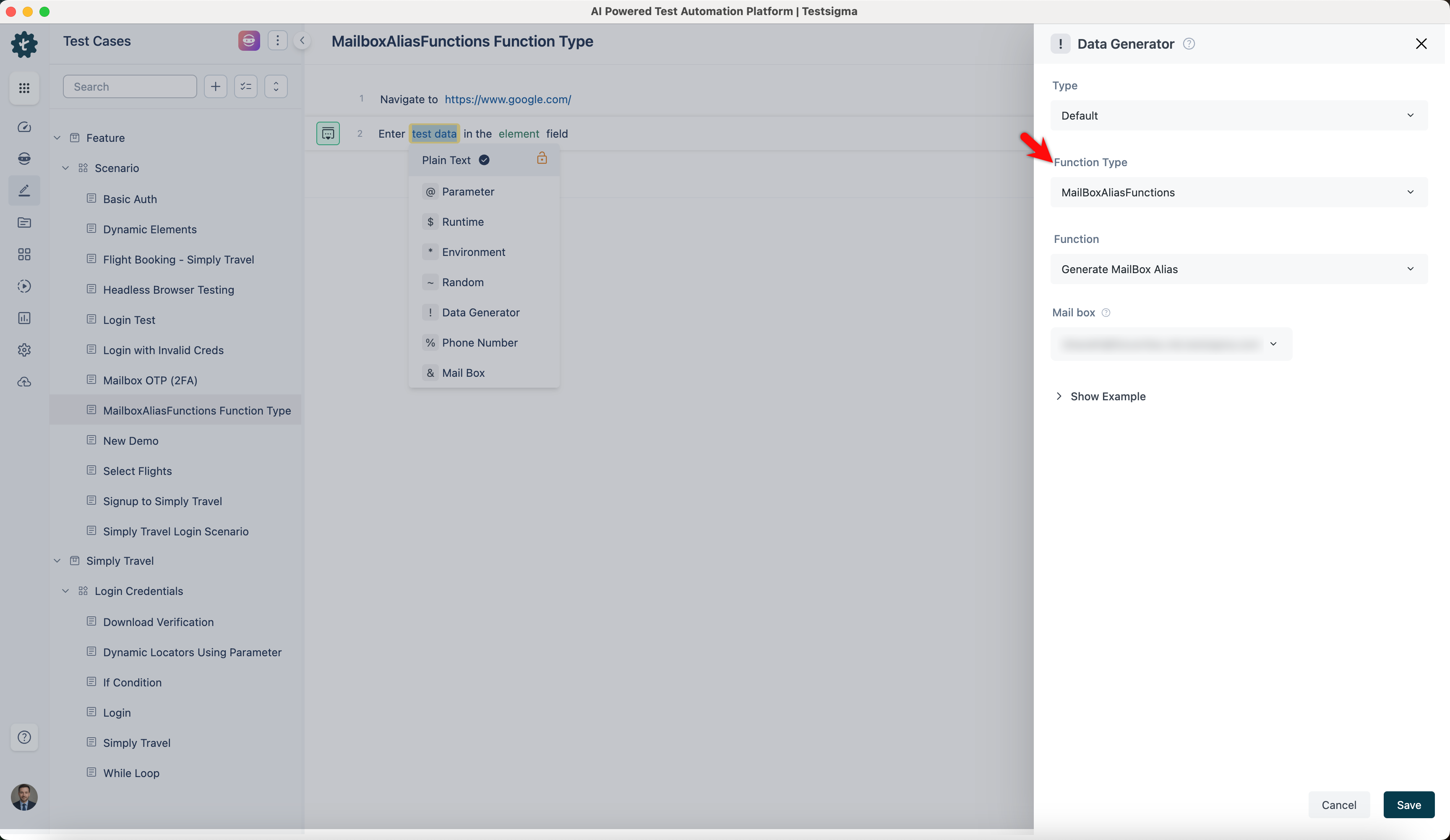
Generate Mailbox Alias
Section titled “Generate Mailbox Alias”- Allows you to create a unique mailbox alias associated with your primary email account.
- Each alias creates a unique mailbox address, allowing multiple mailboxes to be directed to the same inbox for testing and automation.
ℹ️Example:
| Input | Output |
|---|---|
| Selected MailBox | mailboxalias123@example.com |
| Selected MailBox | user1alias456@example.com |
| Selected MailBox | testuseralias789@example.com |
| Selected MailBox | demoalias101@example.com |
Get Email Content
Section titled “Get Email Content”- Enables you to retrieve the entire content of an email in a variable. It fetches the body content of an email dynamically during test execution.
ℹ️Example:
| Input | Output |
|---|---|
| Runtime Variable: inbox Timeout: 30 |
Hello! This is the content of your email. |
| Runtime Variable: promotions Timeout: 30 |
Get 50% off on your next purchase. |
| Runtime Variable: updates Timeout: 30 |
Your order has been shipped. |
| Runtime Variable: spam Timeout: 30 |
Congratulations! You've won a prize. |
Get Email Subject
Section titled “Get Email Subject”- Allows you to retrieve the subject of an email in a variable. It is used to capture email subjects dynamically during test execution.
ℹ️Example:
| Input | Output |
|---|---|
| Runtime Variable: inbox Timeout: 30 |
Your Order Confirmation |
| Runtime Variable: promotions Timeout: 30 |
Special Offer Just for You |
| Runtime Variable: updates Timeout: 30 |
Account Verification Required |
| Runtime Variable: spam Timeout: 30 |
You've Been Selected! |
Get OTP
Section titled “Get OTP”- Enables you to extract the OTP sent to the mailbox into a variable based on a regex pattern.
ℹ️Example:
| Input | Output |
|---|---|
| Regex: \d{6} Runtime Variable: inbox, Timeout: 30 |
123456 |
| Regex: \d{4} Runtime Variable: inbox Timeout: 30 |
7890 |
| Regex: \d{5} Runtime Variable: promotions Timeout: 30 |
54321 |
| Regex: \d{6} Runtime Variable: updates Timeout: 30 |
654321 |
URL with Text
Section titled “URL with Text”- Allows you to extract a URL containing specific text from the email.
ℹ️Example:
| Input | Output |
|---|---|
| Text: Verify Runtime Variable: inbox Timeout: 30 |
https://example.com/verify |
| Text: Confirm Runtime Variable: promotions Timeout: 30 |
https://example.com/confirm |
| Text: Reset Runtime Variable: updates Timeout: 30 |
https://example.com/reset |
| Text: Activate Runtime Variable: spam Timeout: 30 |
https://example.com/activate |
URL which Contains
Section titled “URL which Contains”- Enables you to extract a URL containing specific parameters from the email.
ℹ️Example:
| Input | Output |
|---|---|
| Substring: verify Runtime Variable: inbox Timeout: 30 |
https://example.com/verify |
| Substring: confirm Runtime Variable: promotions Timeout: 30 |
https://example.com/confirm |
| Substring: reset Runtime Variable: updates Timeout: 30 |
https://example.com/reset |
| Substring: activate Runtime Variable: spam Timeout: 30 |
https://example.com/activate |
URL Matching Regex
Section titled “URL Matching Regex”- Allows you to extract a URL from the email that matches a specific regex pattern.
ℹ️Example:
| Input | Output |
|---|---|
| Regex: r'https://\w+\.com/\w+' Runtime Variable: inbox Timeout: 30 |
https://example.com/verify |
| Regex: r'https://\w+\.com/\w+' Runtime Variable: promotions Timeoutv: 30 |
https://promo.com/deal |
| Regex: r'https://\w+\.com/\w+' Runtime Variable: updates Timeout: 30 |
https://updates.com/info |
| Regex: r'https://\w+\.com/\w+' Runtime Variable: spam Timeout: 30 |
https://spam.com/win |
Get Sender Email
Section titled “Get Sender Email”- Enables you to extract the sender’s email address from an email for testing purposes.
ℹ️Example:
| Input | Output |
|---|---|
| Runtime Variable: inbox Timeout: 30 |
sender@example.com |
| Runtime Variable: promotions Timeout: 30 |
promo@example.com |
| Runtime Variable: updates Timeout: 30 |
updates@example.com |
| Runtime Variable: spam Timeout: 30 |
spam@example.com |
Get Sender Name
Section titled “Get Sender Name”- Allows you to extract the sender’s name from an email for testing purposes.
ℹ️Example:
| Input | Output |
|---|---|
| Runtime Variable: inbox Timeout: 30 |
John Doe |
| Runtime Variable: promotions Timeout: 30 |
Promo Sender |
| Runtime Variable: updates Timeout: 30 |
Update Sender |
| Runtime Variable: spam Timeout: 30 |
Spam Sender |